URL & Domain Name System
Every website has an address you type in your browser — a URL. Behind the scenes, the Domain Name System (DNS) translates human-readable names into IP addresses that computers understand to route traffic.
Learning Objectives
- 11.6.2.1 Explain the structure and purpose of URL and DNS.
Conceptual Anchor
The Phone Book Analogy
You remember your friend's name but not their phone number. A phone book maps
names to numbers. DNS is the internet's decentralized phone book: you type google.com (name)
and DNS looks up 142.250.74.46 (IP address) so your browser knows exactly which server to connect to globally.
Visualizing DNS
Animated explanation of the DNS resolution process.
Rules & Theory
1. URL Structure & FQDN
A URL (Uniform Resource Locator) is a reference to a web resource that specifies its location on a computer network and a mechanism for retrieving it. The domain part of a URL is often referred to as an FQDN (Fully Qualified Domain Name), which specifies the exact location in the tree hierarchy of the DNS.
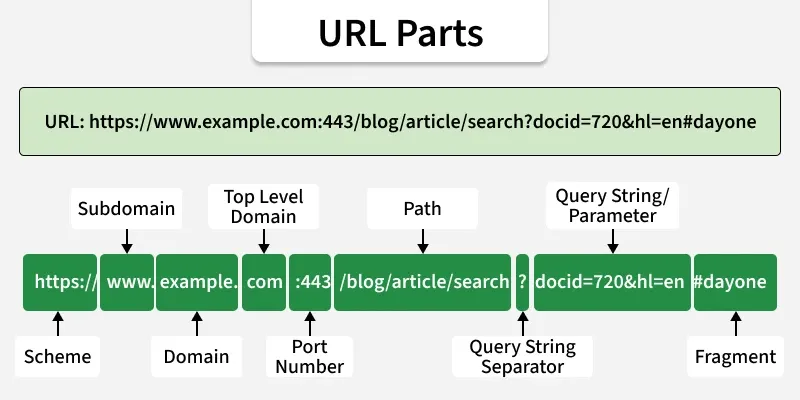
  Protocol  – https:// (secure) or http:// (not secure)
  Subdomain – www (optional prefix, identifies a specific server)
  Domain    – example.com (registered FQDN)
  TLD       – .com, .org, .kz, .edu (Top-Level Domain)
  Port      – 443 (HTTPS default) or 80 (HTTP default) — usually hidden
  Path      – /courses/cs11/index.html (specific file or directory)
  Query     – ?page=2 (parameters sent to the server database)
  Fragment  – #section3 (client-side anchor, jumps to a section on the page)
2. How DNS Resolution Works
When you enter a URL, the DNS process uses a mix of Recursive queries (your ISP asking servers on your behalf) and Iterative queries (servers referring your ISP to other servers down the hierarchy).
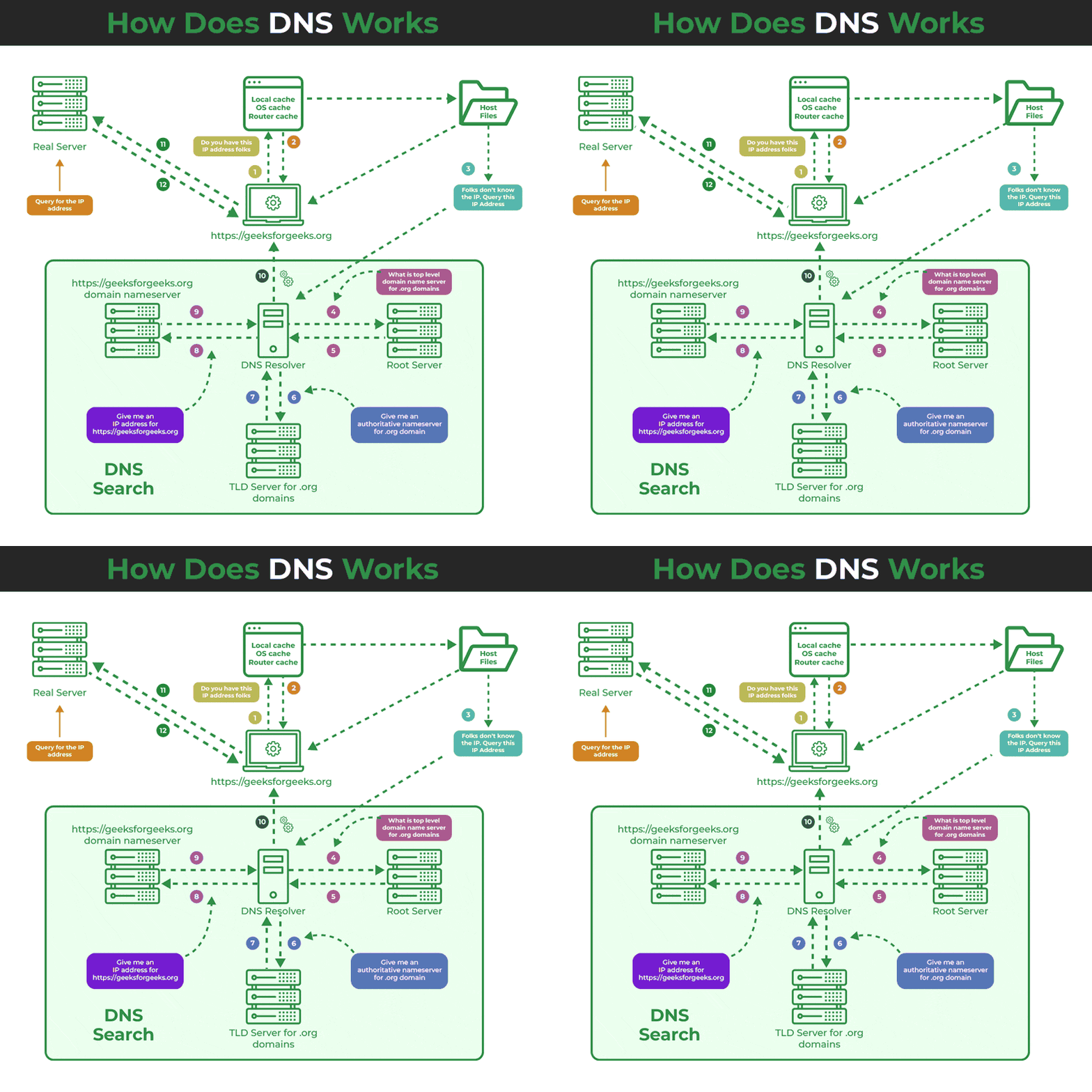
You type: https://geeksforgeeks.org

Step 1: Browser checks LOCAL CACHE (browser, OS, and router cache).
Step 2: If not cached → OS asks the DNS RESOLVER.
Step 3: DNS Resolver asks ROOT SERVER → "Who handles .org domains?"
Step 4: Root replies iteratively → "Ask the .org TLD server."
Step 5: DNS Resolver asks TLD SERVER → "Who handles geeksforgeeks.org?"
Step 6: TLD server replies → "Ask the authoritative nameserver."
Step 7: DNS Resolver asks AUTHORITATIVE SERVER for geeksforgeeks.org.
Step 8: Authoritative server replies → Returns the exact IP address.
Step 9: IP address is returned to browser, cached, and connection to REAL SERVER is established!
3. DNS Hierarchy & Server Types
| Level | Server Role | Example |
|---|---|---|
| Root | The top of the hierarchy. Directs queries to the appropriate TLD server. 13 logical root servers worldwide (labeled A–M). | a.root-servers.net |
| TLD (Top-Level Domain) | Stores information for all domain names that share a common extension. | .com, .org, .kz, .uk |
| Authoritative | The final server that holds the actual IP records for a specific domain. | ns1.amazon.com |
4. Types of DNS Records
| Record | Purpose | Example |
|---|---|---|
| A | Maps domain → IPv4 address. (Most common) | example.com → 93.184.216.34 |
| AAAA | Maps domain → IPv6 address. | example.com → 2606:2800:… |
| CNAME | Canonical Name. Alias that points one domain to another domain name. | www.example.com → example.com |
| MX | Mail Exchange. Directs email to a mail server. | mail.example.com |
DNS Caching & TTL
To prevent overloading root servers, DNS results are cached at every level (browser, OS, ISP). Each record has a TTL (Time To Live) value — after this expires in seconds, the cache is refreshed. This is why migrating a website to a new server IP can take up to 48 hours to propagate globally.
Common Pitfalls
URL vs Domain Name
A domain name is only ONE PART of the URL. The full URL includes the protocol, domain, path,
and query. google.com is a domain;
https://www.google.com/search?q=DNS
is a URL.
Tasks
Label all parts of this URL:
https://www.school.edu.kz/students/grades.html?term=4#math
Cisco Packet Tracer Lab: Add a Server-PT to your network and activate the DNS Service. Create an "A Record" mapping www.nis.edu.kz to the IP address of another Web Server in your network. On a PC-PT, set its DNS Server IP to your new DNS server. Open the PC web browser and type the URL to verify resolution.
Explain the difference between a Root Server and an Authoritative Server in the DNS resolution process.
A company changes its web server hardware and gets a new IP address. They update their 'A Record', but some users still see the old offline website. Explain why this happens and what role TTL plays in the solution.
Self-Check Quiz
Q1: What does DNS stand for, and what is its primary function?
Q2: What is the TLD of the domain "portal.school.edu.kz"?
Q3: What specific DNS record type is required to map a domain to an IPv6 address?