Client-Server Model
The client-server model is the dominant architecture for networked applications. A central server provides services, and clients request them. This centralized approach provides security and efficient resource management.
Learning Objectives
- 11.6.2.3 Describe the features of the client-server model and compare it with P2P networks.
Conceptual Anchor
The Restaurant Analogy
In a restaurant, you (the client) make a request (order food). The kitchen (the server) processes your request and sends back the result (your meal). Many clients can be served simultaneously, but the kitchen centrally manages all the resources and recipes.
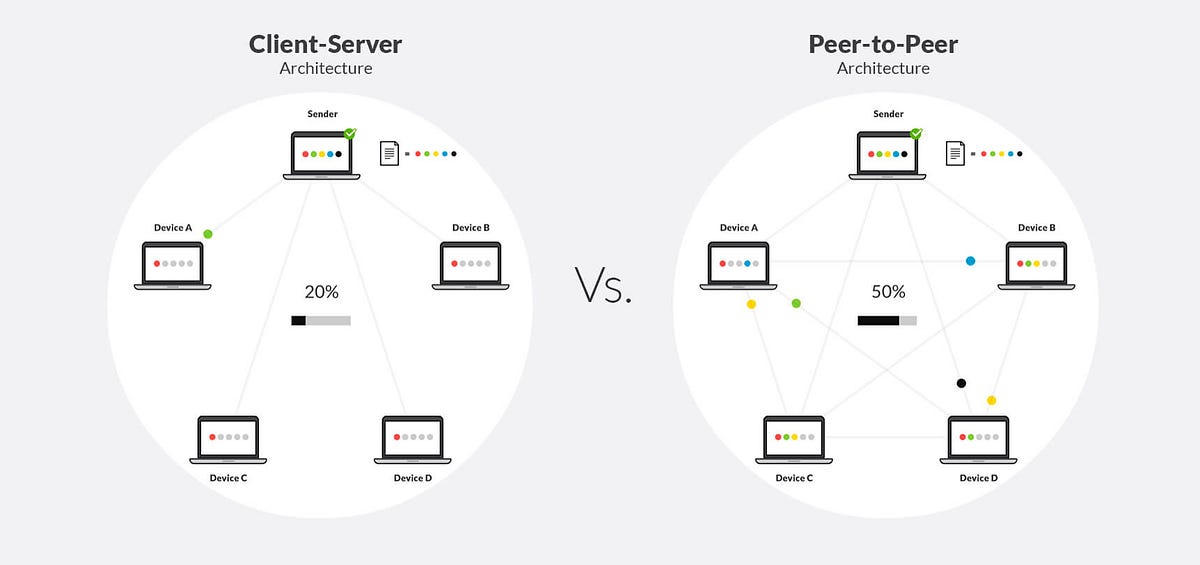
Visualizing the Architecture
Detailed breakdown of Client-Server vs Peer-to-Peer structures by Craig 'n' Dave.
Rules & Theory
1. The Request-Response Cycle
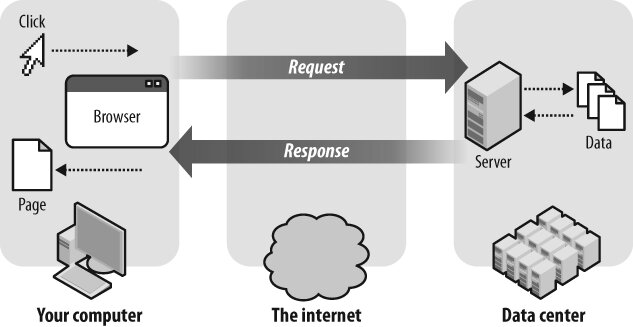
1. Client sends a REQUEST (e.g., HTTP GET /index.html)
2. Server PROCESSES the request (authenticates, queries DB)
3. Server sends a RESPONSE (the webpage data / JSON)
4. Client DISPLAYS the result
2. Client vs Server Roles
| Feature | Client | Server |
|---|---|---|
| Role | Initiates requests to the server. | Listens for requests and fulfills them. |
| Hardware | Regular PC, smartphone, tablet. | Powerful machine, high RAM, redundant storage. |
| Software | Browser, email client, mobile app. | Apache, Nginx, MySQL, MS Exchange. |
| Number | Many (thousands/millions per server). | One or a clustered few. |
| Availability | Turns on/off as needed by the user. | 24/7 uptime expected. |
3. Differences between Client-Server and P2P Networks
| Criterion | Client-server | Peer-to-Peer (P2P) |
|---|---|---|
| Security | The server controls security of the network. | No central control over security. |
| Management | The server manages the network. Needs a dedicated team of people to manage the server. | No central control over the network. Anyone can set up. |
| Dependency | Clients are dependent on the server. | Clients are not dependent on a central server. |
| Performance | The server can be upgraded to be made more powerful to cope with high demand. | If machines on the network are slow they will slow down other machines. |
| Backups | Data is all backed up on the main server. | Each computer has to be backed up. Data can easily be deleted by users. |
Thin vs Thick Clients
Thin client — relies heavily on the server for processing (e.g., Google Docs, Chromebooks). Thick (Fat) client — performs most processing locally on the client device (e.g., installed desktop video games, Adobe Photoshop).
Common Pitfalls
"Server" = Big Computer
A server is defined by its software role, not its hardware. Any computer running server software (like Apache or a Minecraft Server application) that listens for incoming requests is acting as a server.
Tasks
Define the roles of a client and a server. List three specific types of servers (e.g., web, database, mail).
Cisco Packet Tracer Lab: Place a Server-PT and a PC-PT connected via a switch. On the Server, navigate to Services > HTTP and ensure it is ON. Assign the Server an IP (192.168.1.10). Assign the PC an IP (192.168.1.11). Open the PC's web browser, enter the Server's IP, and observe the Client-Server request-response cycle in action.
Explain the request-response cycle using the example of loading a YouTube video on your smartphone.
Based on the factors of Management and Backups, justify why a large international bank must use a Client-Server architecture rather than a Peer-to-Peer network.
Self-Check Quiz
Q1: According to the network differences, which architecture relies on a dedicated team to manage the network?
Q2: In terms of performance, what happens in a P2P network if several connected machines have very slow internet connections?
Q3: Is a mobile banking app a thin client or a thick client?