Network Hardware
Networks require specialized hardware to transmit, receive, and route data. Understanding the purpose, function, and OSI layer of each device is essential for designing and troubleshooting complex networks.
Learning Objectives
- 11.6.1.3 Explain the purpose of network equipment (Router, switch, hub, repeater, bridge, network adapter, modem, Gateway).
Conceptual Anchor
The Postal System Analogy
A NIC is your physical mailbox. A hub is a town crier shouting the message to everyone on the street. A switch is a local post office that reads the exact street address and delivers only to the right person. A router is an international mail sorting center that sends packages between entirely different postal systems (networks).
Visualizing Network Devices
Animated breakdown of how data moves through Hubs, Switches, and Routers.
Rules & Theory
1. Core Network Devices
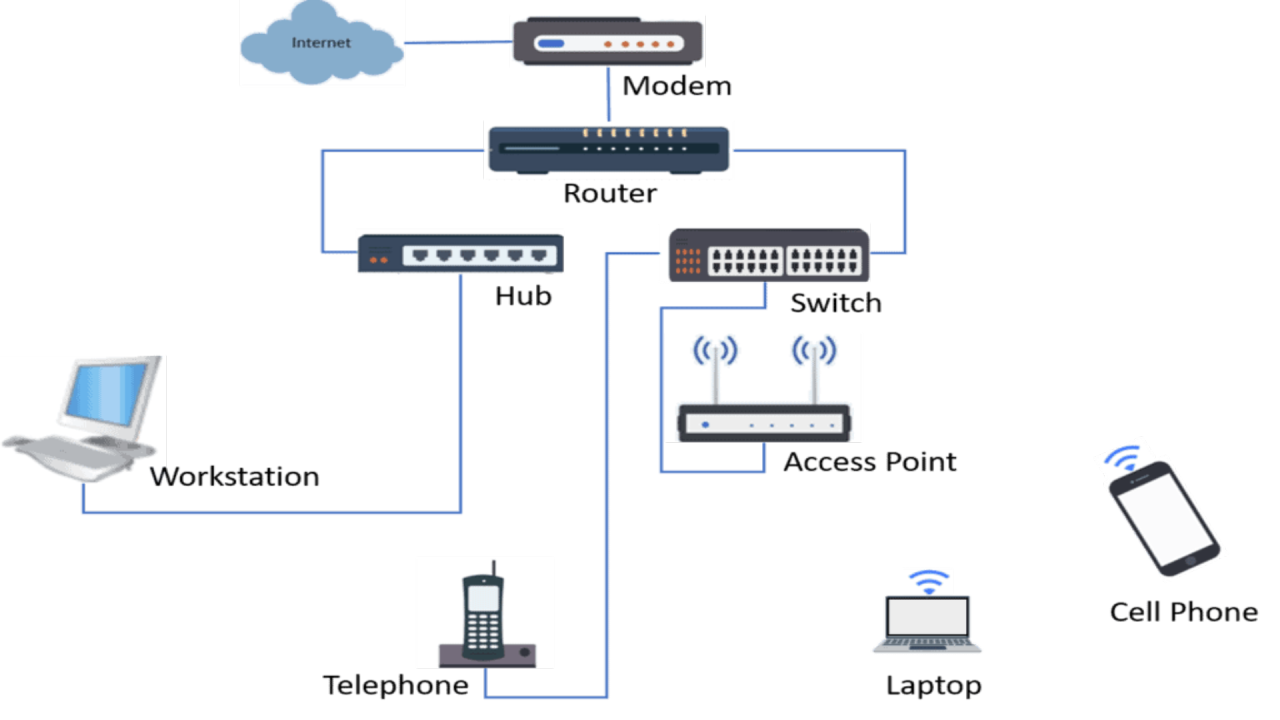
| Device | Purpose & Definition | Intelligence / Layer |
|---|---|---|
| NIC (Network Interface Card) | Connects a device to the network. Every NIC has a permanent, unique hardware identifier called a MAC address. | Layer 1 & 2 |
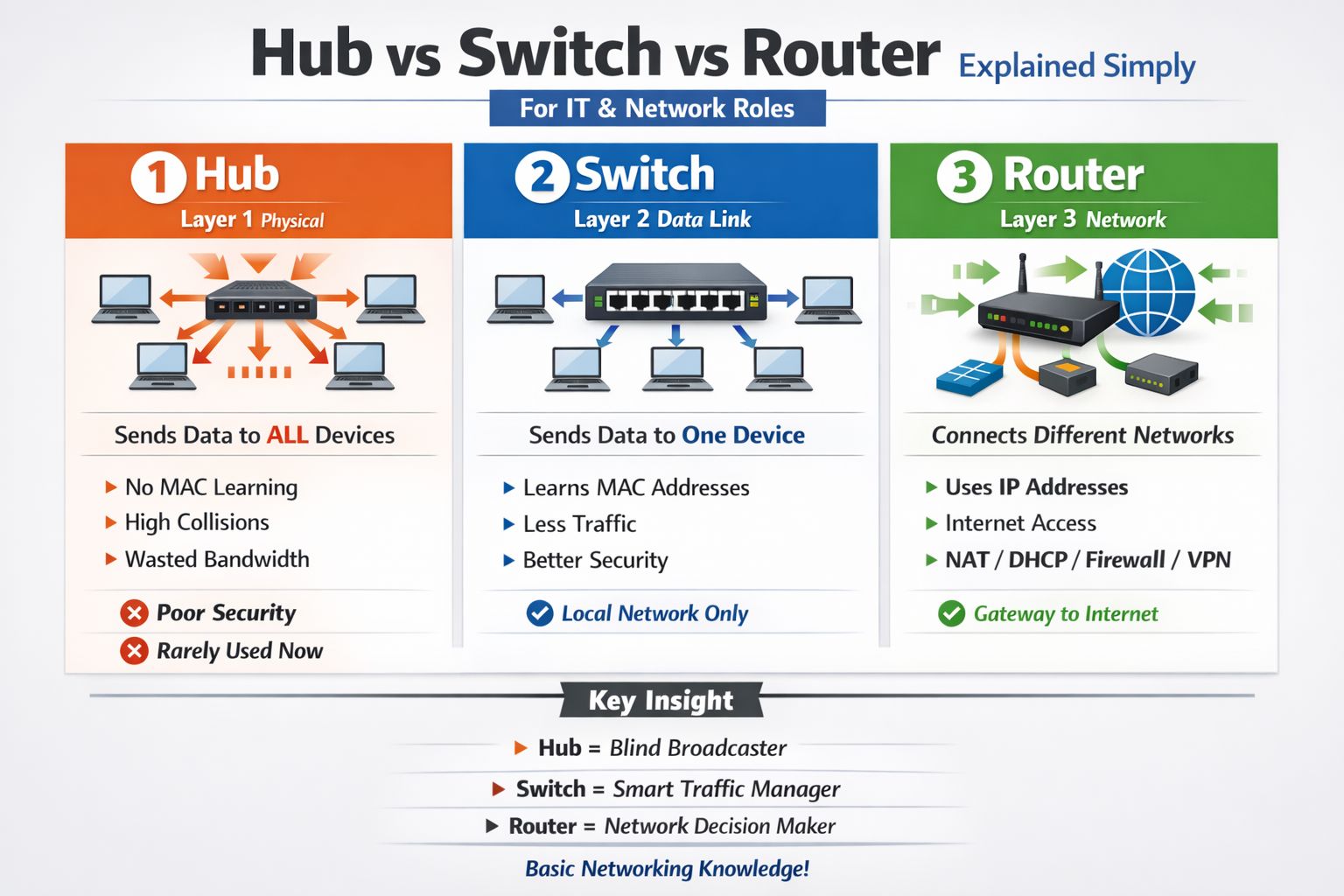
| Hub | Connects multiple devices in a LAN. It receives data on one port and blindly broadcasts it to ALL other ports. | Dumb (Layer 1) — creates high network traffic and data collisions. |
| Switch | Connects multiple devices in a LAN. It stores MAC addresses in a routing table and sends data ONLY to the specific intended recipient. | Smart (Layer 2) — eliminates collisions, highly efficient. |
| Router | Connects DIFFERENT networks together (e.g., your LAN to the WAN/Internet). Routes packets based on IP addresses. | Smartest (Layer 3) — determines the most efficient path for data. |
| Bridge | Connects two similar LAN segments to act as a single network. Filters traffic based on MAC addresses to reduce congestion. | Layer 2 — often replaced by switches today. |
| Gateway | A node that connects two networks with different protocols (e.g., connecting a local LAN to the internet). Routers typically act as gateways. | Can operate at any OSI layer. |
| Modem | Modulator-Demodulator. Converts digital signals from a computer into analog signals for transmission over telephone/cable lines, and vice versa. | Essential for establishing an ISP connection. |
| Repeater | Boosts (regenerates) a degraded signal to extend the maximum physical range of a network cable. | Simple (Layer 1) — amplifies everything, including noise. |
2. Hub vs Switch vs Router (Advanced Comparison)
| Feature | Hub | Switch | Router |
|---|---|---|---|
| OSI Layer | Layer 1 (Physical) | Layer 2 (Data Link) | Layer 3 (Network) |
| Addressing Used | None (Broadcasts blindly) | MAC address (Hardware) | IP address (Logical) |
| Data Delivery | Broadcast (sent to all ports) | Unicast (sent to target only) | Routing between networks |
| Collision Domain | Single (all ports share the risk of data crashing) | Separate per port (collisions eliminated) | Separate per interface |
| Broadcast Domain | Single | Single | Separate (Routers block broadcasts) |
SOHO Routers (Home Routers) = Combo Devices
Your home Wi-Fi "router" is actually an all-in-one appliance combining: a Modem (connects to ISP via cable/fiber) + a Router (routes traffic between your home LAN and the Internet) + a Switch (the 4 Ethernet ports on the back) + a WAP (Wireless Access Point for Wi-Fi). In enterprise networks (like school campuses), these are strictly separate, dedicated devices.
Common Pitfalls
Confusing MAC and IP Addresses
Switches use MAC addresses (physical, permanent, burned into the NIC) to forward frames within the SAME network. Routers use IP addresses (logical, dynamic, assigned by software) to route packets between DIFFERENT networks.
Hubs vs Switches in Exams
Never recommend a Hub for a modern network design in an exam. Hubs waste bandwidth by broadcasting and pose a severe security risk (packet sniffing). Always specify a Switch.
Tasks
Define the specific functions of a Bridge, Gateway, and Repeater.
Cisco Packet Tracer Activity: Create two separate LANs (Network A: 192.168.1.0 and Network B: 192.168.2.0). Use a Switch for each LAN. Then, deploy a Router (e.g., 1841) to act as the Gateway connecting both LANs. Configure the router interfaces and test ping connectivity between a PC in Network A and a PC in Network B.
A new computer lab is being built on an island off the main school campus. Describe the hardware required to connect the PCs in the new lab to each other, and the hardware required to link this new lab back to the main campus network over a long distance.
Explain why replacing a Hub with a Switch immediately improves both the speed (bandwidth utilization) and the security of a Local Area Network.
Self-Check Quiz
Q1: Which device operates at Layer 3 of the OSI model and connects different networks?
Q2: Why is a switch considered "smarter" than a hub?
Q3: What device is necessary to convert digital computer signals to analog signals for transmission over external ISP lines?