Network Topology
Topology is the arrangement (layout) of devices and connections in a network. The choice of topology affects performance, cost, and reliability.
Learning Objectives
- 11.6.1.2 Describe bus, ring, star, and mixed topologies.
Conceptual Anchor
The Road System Analogy
Think of network topology like road layouts. A bus is a single main road with houses along it. A ring is a circular road. A star is a roundabout with roads radiating out. A mesh is a city grid where every intersection connects to many others.
Visualizing Topologies
Animated explanation of fundamental network structures.
Rules & Theory
1. Bus Topology
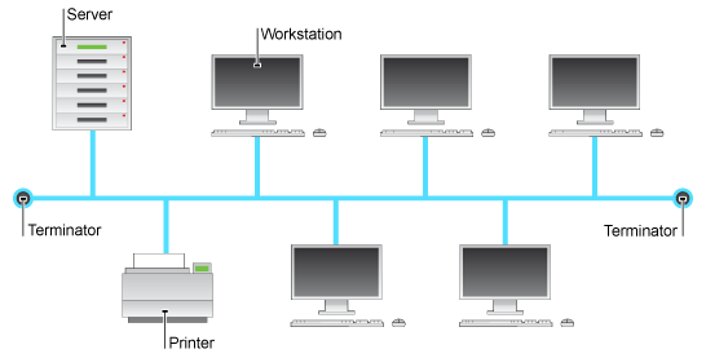
Definition: A network layout where a single central cable (the backbone) joins all of the workstations, printer, file server and other components together. At each end of the bus is a 'terminator'.
Why it is used: The terminator is a piece of hardware which prevents signals bouncing back and forth, avoiding data echoes. It is highly cost-effective as it requires minimal cabling.
Application: Because it is easy to install and uses less cable, it is often considered the best choice for temporary or very small networks.
| Advantages | Disadvantages |
|---|---|
| Uses less cable than a Star network. | If there is a problem with the central cable, the entire network stops working. |
| Best choice for temporary networks. | If there are a lot of workstations on the network, data can travel slowly and collisions happen. |
| Easy to install and add extra workstations. | Low security - every workstation can see all of the data in the network. |
2. Ring Topology
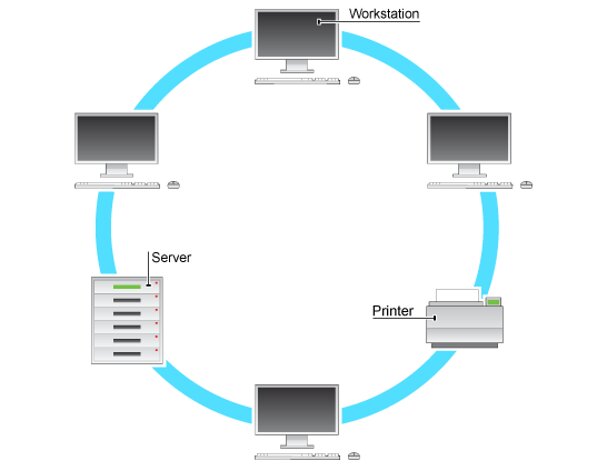
Definition: In a ring network layout, all of the computers are connected to one another in a closed circle.
Why it is used: The data passes from one computer to the next one and then all the way around the ring layout until it reaches the destination computer. Transmission is fairly simple as data only travels in one direction, which eliminates data collisions[cite: 76, 77].
Application: Historically used in Token Ring networks where predictable performance under heavy traffic was required.
| Advantages | Disadvantages |
|---|---|
| Transmission of data is fairly simple as it only travels in one direction. | If a single machine is switched off or a cable breaks, the entire network doesn't work. |
| No data collisions occur. | You have to shut down the network to be able to add extra computers. |
| Extra computers can be added easily with little effect on performance. | Data must pass through every computer until it reaches its destination, making it slower. |
3. Star Topology
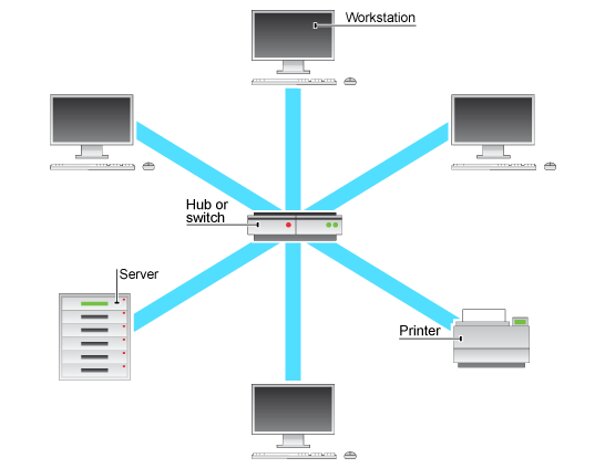
Definition: In a star network layout, each workstation is connected by its own dedicated cable directly to the central server or network switch.
Why it is used: This isolation prevents disruptions. If one cable fails, only that specific device drops offline, leaving the rest of the network functional. It also provides good security, as no workstation can interact with another without going through the central server first[cite: 88].
Application: Star networks are usually the layout of choice in modern schools and offices because they tend to be the most reliable of the topologies.
| Advantages | Disadvantages |
|---|---|
| Very reliable. If one connection fails, it does not affect other users. | If the server or switch stops working, nobody will be able to use the network. |
| Good security - no workstation can interact with another without going through the server. | The most expensive network layout to install because of the amount of cables needed. |
| Very few data collisions as each workstation has its own cable to the server. | Installing the network usually needs experts and extra hardware (hubs/switches). |
4. Mixed / Mesh Topology
Definition: A mixed (or hybrid) topology combines elements of different base topologies (e.g., connecting several Star networks to a central Bus backbone). A full mesh topology connects every single node directly to every other node.
Why it is used: It provides unparalleled redundancy. If one routing path fails, the data automatically finds an alternative route to its destination.
Application: Used in critical infrastructure, large-scale WANs, and the core routing framework of the Internet itself.
| Advantages | Disadvantages |
|---|---|
| Highly reliable — multiple alternative paths for data transmission. | Extremely expensive due to excessive amounts of cabling and switch ports required. |
| No single point of failure can bring down the entire network infrastructure. | Highly complex to mathematically plan, physically set up, and manage. |
Industry Standard Summary
Star networks are the absolute standard for local area networks (LANs) today. Their balance of centralized security and fault tolerance makes them ideal[cite: 60]. Mixed topologies represent how real-world enterprise networks are built[cite: 45].
Common Pitfalls
Topology = Physical Layout
Students sometimes confuse logical topology (how data logically flows between devices) with physical topology (how the physical cables are actually arranged). For example, a network can be wired physically as a star using a central hub, but function logically as a ring passing tokens.
Tasks
Draw block diagrams for bus, ring, star, and mixed topologies, clearly labeling central devices and terminators.
Cisco Packet Tracer Lab: Build a logical network environment containing a Bus and a Star topology. Use PT Hubs, 2960-24TT Switches, and 1841 Routers. Configure static IP addresses (e.g., 192.168.0.x) and test data transmission using PDU messages[cite: 117].
A school has 3 computer labs with 15 computers each. Recommend a physical topology for each lab and explain your choice based on reliability, hardware needs, and Cambridge A Level standards.
Compare bus and star topologies in terms of cost, reliability, and security. Which would you strongly recommend for a rapidly growing e-commerce business? Justify your architectural decision.
Self-Check Quiz
Q1: Which topology has a single point of failure at the central switch, but is the most reliable and common layout in offices?
Q2: In which topology does data inherently travel in one direction to completely avoid data collisions?
Q3: What is the specific hardware purpose of a terminator in a Bus topology?