Cascading Style Sheets (CSS)
Understanding how to properly style HTML pages is a core skill in web development. In this lesson, we will explore and compare the three main types of CSS implementation — Inline, Internal, and External — and learn how the browser decides which rule wins when several of them target the same element.
Learning Objectives
- 11.5.3.5 Compare CSS implementation types
- 11.5.3.6 Use CSS when designing a website
Knowledge Retrieval
Let's Recall
Before jumping into CSS types, make sure you can answer these core questions:
- What does CSS mean? (Cascading Style Sheets — it separates HTML content from design).
- Why are identifiers (ID) and classes used? (To target specific elements or groups of elements for styling without affecting the whole page).
- What does the word "Cascading" hint at? (That styles flow down and can override one another — which is exactly what this lesson explains).
1. Rules & Theory
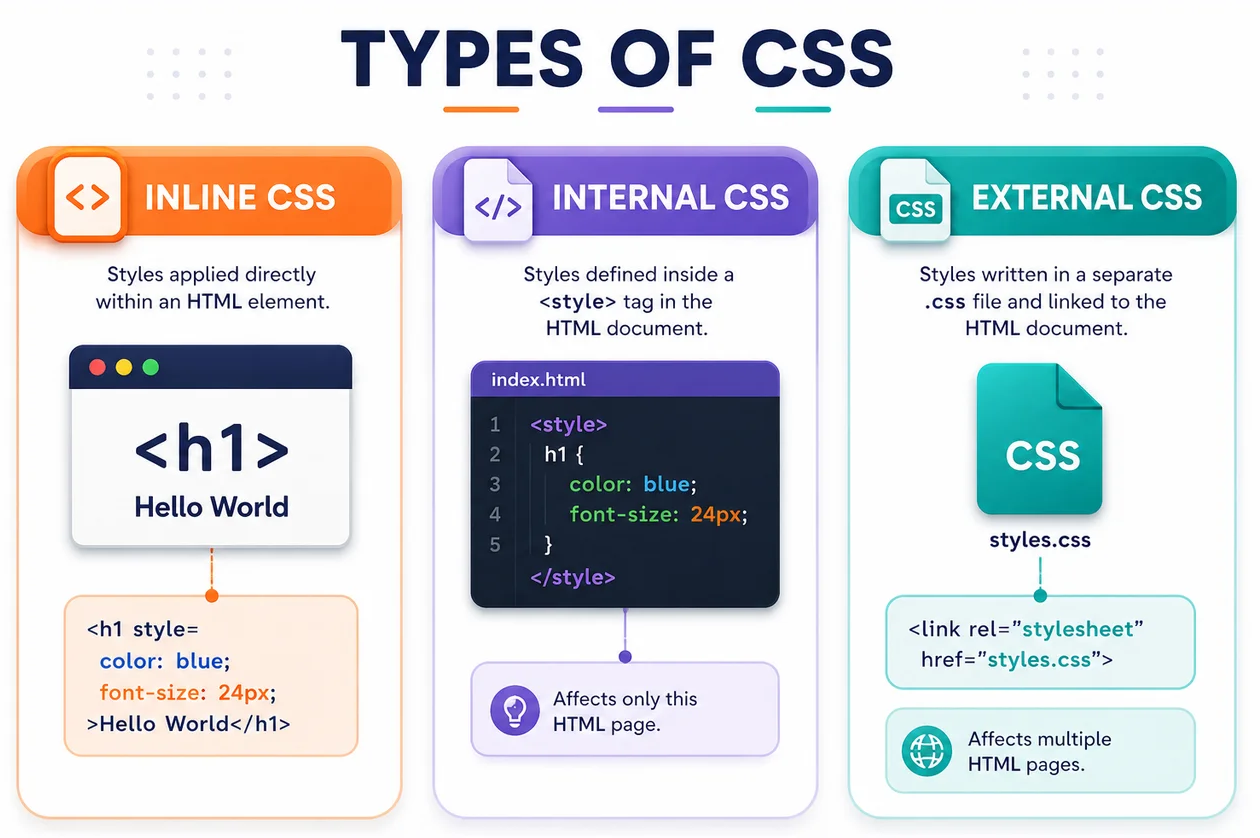
There are three ways to apply CSS to an HTML document. The best method depends on the scope of the project, how many pages need to share the design, and how permanent the styling is meant to be.
Watch: Inline, Internal & External CSS
A short walkthrough of all three methods in action
Comparison Chart
| Type | Application | Scope | Advantages | Disadvantages |
|---|---|---|---|---|
| Inline CSS | Using the style attribute directly inside HTML tags. |
A single specific element. | Highest priority. Good for quick, temporary overrides or JS-generated styles. | Mixes content with design. Very hard to maintain across a site. |
| Internal CSS | Using the <style> tag inside the <head> section. |
A single HTML document. | Does not require uploading extra files. Keeps styles grouped per page. | Cannot be shared across multiple pages. Increases HTML file size. |
| External CSS | Placing styles in a separate .css file and linking it via <link>. |
The entire website (multiple pages). | Clean HTML, full reusability, easy to maintain globally, faster loading (caching). | Requires an extra HTTP request to fetch the file (minor performance impact on first load). |
The Cascade & Specificity
When two or more rules target the same element, the browser must pick a winner — this is the "C" in CSS. From highest to lowest priority:
!important— overrides everything else (use only as a last resort)- Inline CSS —
style="..."on the element itself - ID selectors —
#header - Class, attribute, and pseudo-class selectors —
.title,[type],:hover - Element and pseudo-element selectors —
p,::before
If two rules have equal specificity, the one written later in the source order wins — which is why an internal <style> block placed after a <link> can override the external file.
Cheat Sheet: Attaching CSS — Syntax Reference
| Method | Syntax pattern | Notes |
|---|---|---|
| Inline | <p style="color:red;"> |
Declarations go directly in the attribute, separated by semicolons. |
| Internal | <style> ... </style> |
Must sit inside <head>; contains full CSS rules. |
| External | <link rel="stylesheet" href="styles.css"> |
href holds the file path; goes inside <head>. |
| Multiple files | <link href="reset.css"><link href="main.css"> |
Later linked file wins on conflicts (source order rule). |
@import (rare) |
@import url("theme.css"); |
Written inside a stylesheet or <style> block; slower than <link> — avoid in production. |
Cheat Sheet: Selectors
| Selector | Example | Matches |
|---|---|---|
| Element | p { } | Every <p> on the page |
| Class | .card { } | Any element with class="card" |
| ID | #main { } | The one element with id="main" |
| Universal | * { } | Every element on the page |
| Grouping | h1, h2 { } | Both <h1> AND <h2> |
| Descendant | nav a { } | Any <a> nested anywhere inside <nav> |
| Direct child | ul > li { } | <li> that are direct children of <ul> |
| Attribute | input[type="text"] { } | Inputs with that exact attribute value |
| Pseudo-class | a:hover { } | A link while the mouse hovers over it |
| Pseudo-element | p::first-line { } | Just the first line of text inside a <p> |
Cheat Sheet: Common Property Groups
| Group | Key properties | Quick example |
|---|---|---|
| Text & Font | color, font-family, font-size, font-weight, text-align | color: #1a1a1a; font-size: 1rem; |
| Box Model | width, height, margin, padding, border | padding: 10px; border: 1px solid #ccc; |
| Background | background-color, background-image, background-size | background-color: lightblue; |
| Layout & Position | display, position, top/left, flex | display: flex; justify-content: center; |
| Effects | opacity, box-shadow, transition, transform | transition: all 0.3s ease; |
2. Worked Examples
Read through each example, then predict the result before checking the explanation underneath the code.
1 Inline CSS
Goal: style a single heading directly inside its tag.
<h1 style="color: blue; font-size: 36px; margin-top: 20px;"> Welcome </h1>Result: the word "Welcome" renders in blue, at 36px, with extra space above it. Because the rule lives inside the tag itself, it applies to this element only — copy the <h1> anywhere else and you'd have to retype the whole style attribute.
2 Internal CSS
Goal: style every <h2> and <p> on one page from a single block.
<head>
  <style>
    h2 {
      color: green;
      font-size: 24px;
    }
    p {
      font-style: italic;
      font-size: 16px;
    }
  </style>
</head>
Result: every <h2> on this page turns green at 24px, and every <p> becomes italic at 16px — but only on this document. A second HTML page would need the whole <style> block pasted in again.
3 External CSS
Goal: define reusable rules once and share them across the whole site.
/* styles.css */
h3 {
  color: red;
  font-size: 20px;
}
button {
  background-color: lightblue;
  color: white;
  padding: 10px;
}
<head>
<link rel="stylesheet" href="styles.css">
</head>Result: any page that links styles.css gets red <h3> headings and light-blue buttons automatically. Update the one file, and every linked page updates too — and after the first visit, the browser caches it, so later page loads are faster.
4 Combining All Three — Reading the Cascade
Goal: predict which rule wins when Inline, Internal, and External CSS all target overlapping elements.
/* styles.css (external) */
h1 { color: navy; }
h2 { color: red; }
<head>
<link rel="stylesheet" href="styles.css">
<style>
h1 { color: purple; }
</style>
</head>
<body>
<h1>Home page</h1>
<h2 style="color: orange;">Subheading</h2>
<p>This is an example paragraph.</p>
</body>Result:
<h1>renders purple, not navy — internal and external rules have equal specificity (both are element selectors), so the one written later in the<head>(internal) wins.<h2>renders orange, not red — inline styling always beats a plain external selector, regardless of source order.<p>renders in the browser's default black — no rule targets it at all, from any of the three types.
3. Common Pitfalls
Missing semicolons
Forgetting ; between declarations (e.g. color: red font-size: 20px) can break the rule that follows. Always end every declaration with a semicolon, even the last one in a block.
<style> placed in the wrong spot
An internal <style> block belongs inside <head>, not <body>. Placing it in the body is invalid HTML and can cause a visible "flash" of unstyled content while the page loads.
Broken or mistyped file paths
A <link href="Style.css"> pointing at a file actually saved as style.css will silently fail on most web servers (file paths are case-sensitive) — no styling appears, and there's no obvious on-page error, only a 404 in the browser's console.
Mixing up . and #
Writing #title { } in your CSS when the HTML actually says class="title" (or vice versa) means the selector never matches anything — the rule quietly does nothing, with no error at all.
Overusing !important
!important forces a rule to win regardless of specificity or source order. Sprinkling it everywhere breaks the natural cascade and makes future overrides very hard to debug — treat it as a last resort, not a habit.
Trusting a cached stylesheet
Because browsers cache external CSS for speed, editing styles.css and refreshing normally may still show the old styles. Use a hard refresh (Ctrl+Shift+R) while testing changes.
So which type should I actually use?
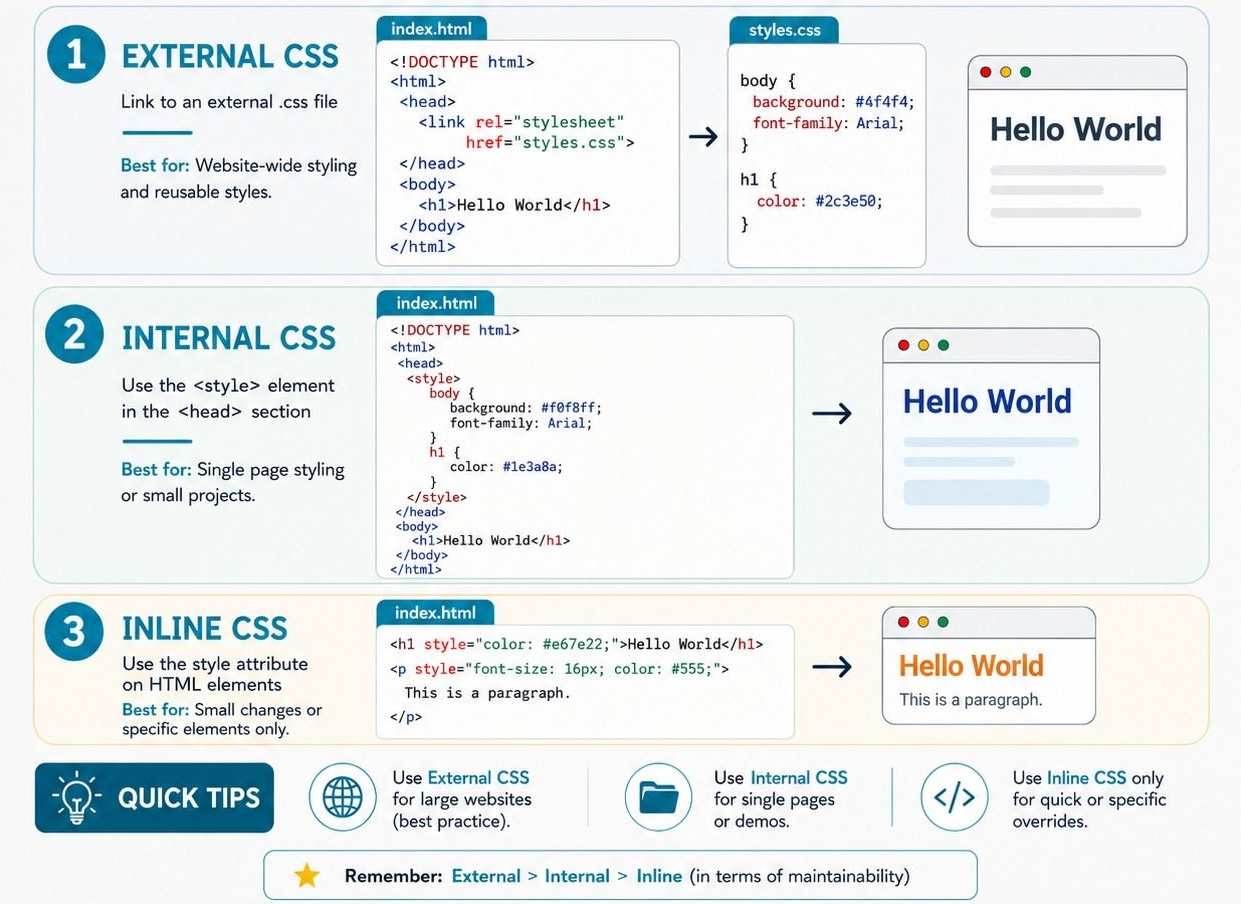
As a default, reach for External CSS on any real project. Use Internal CSS only for a single quick prototype page or an email template. Save Inline CSS for one-off testing or styles generated dynamically by JavaScript.
4. Practice Tasks
Complete the following tasks independently. Note: create a folder for these tasks and use your code editor — no solutions are shown here, so test your own code in the browser.
List the three ways to add CSS to a page, and state one advantage of each.
In your own words, explain why External CSS is usually considered "cleaner" than Inline CSS for a real website.
Build a small HTML file that styles an <h1>, a <p>, and a <button> using Internal CSS only.
Create a separate styles.css file with rules for at least three different elements, then link it correctly to an HTML page.
A page links an external stylesheet, includes an internal <style> block, and has an inline style — all three targeting the same <h2>. Predict which color actually displays, and explain your answer using the cascade rules from this lesson.
Design a simple one-page "About Me" profile using only External CSS, applying at least six different properties across text, box model, background, and layout.
5. Self-Check Quiz
1. What does "CSS" stand for, and what is its core purpose?
2. Which CSS type has the smallest scope — a single element, a single page, or an entire website?
3. Where must the <style> tag for Internal CSS be placed?
<head> section of the HTML document.4. Which HTML tag connects an External CSS file, and which attribute holds its path?
<link> tag, using the href attribute (with rel="stylesheet").5. An element has both an ID-selector rule and a class-selector rule, each setting a different color. Which one wins, and why?
6. True or False: External CSS always loads faster than Internal CSS, on every single page view.
7. A stylesheet linked in <head> sets p { color: blue; }. An internal <style> block placed right after it sets p { color: green; }. No inline style is used. What color is the paragraph text, and why?
8. Critical analysis: which CSS method is most efficient for building a multi-page website, and why?
Extension Activity: Concept Map
In your notebooks, draw a concept map illustrating the three CSS types. Connect each type to its scope, its key advantages and disadvantages, and where it sits in the cascade priority order covered in Section 1.