Information Security, Cyber Threats & Systems
This ultimate revision guide consolidates Grade 11 and Grade 12 concepts across data protection, cyber threats, cryptography, distributed networks (Blockchain), software ethics, and cloud architecture. It is designed to prepare you for complex AS/A Level exam questions requiring comparative analysis.
Revision Objectives
- 11.1.2.1 Explain the differences between security, privacy, and data integrity
- 12.5.2.1-2 Describe types of Malware and Social Engineering attacks
- 12.5.2.6 Differentiate between biometric verification and identification
- 12.5.2.4 Explain secure data transmission protocols (SSL and TLS)
- 11.1.2.3 Describe data backup strategies and disk mirroring (RAID 1)
- 11.1.2.6 Understand the principles and architecture of Blockchain
- 12.5.2.12 Define Intellectual Property, copyright rules, and DRM
- 12.5.4.2 Differentiate between cloud computing deployment and service models
1. Data Protection, CIA Triad & Physical Risks
Information security relies on three core pillars (The CIA Triad). Before software security can be effective, physical hardware must be secured against real-world threats.
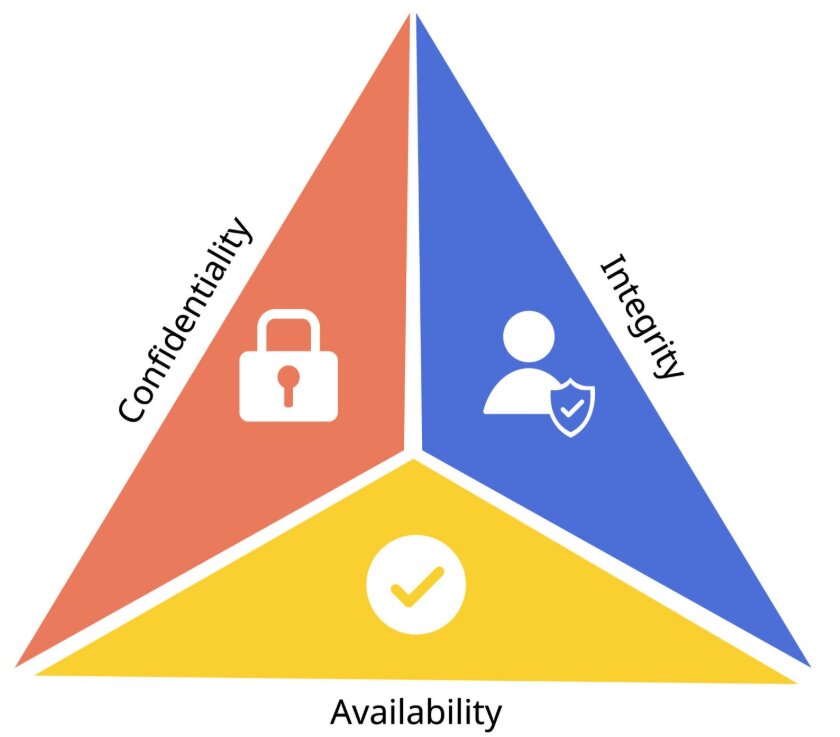
| Concept | Definition | Implementation / Examples |
|---|---|---|
| Confidentiality (Security) | Ensuring data is safe from unauthorized access. | Passwords, Access Control Lists (ACLs), Encryption, Biometrics. |
| Integrity | Ensuring data is accurate, consistent, and has not been maliciously altered. | Hashing, Checksums, Validation, Verification, Digital Signatures. |
| Availability | Ensuring information systems are up and running when needed. | Data Backups, RAID 1, UPS (Uninterruptible Power Supply). |
Physical Risks
Threats like fire, floods, and power surges can destroy hardware. Protective measures include Secure Server Rooms (biometric locks), Fireproof Safes for backup media, and UPS devices to prevent data loss during power outages.
2. Threats to Computer Systems
Threats can target machines through malicious code or target human psychology through manipulation.
Malware (Malicious Software)
- Virus: Attaches to a legitimate file and requires user action to spread.
- Worm: A standalone program that actively replicates itself across networks without human interaction.
- Trojan Horse: Disguised as safe software to trick the user into creating a "backdoor" for hackers.
- Ransomware: Encrypts files and demands financial payment for the decryption key.
Social Engineering & Tracking
- Phishing: Fraudulent emails tricking users into clicking bad links to steal credentials.
- Pharming: Malicious code that redirects users to fake websites even if the correct URL is typed.
- Online Tracking: Uses Cookies, Web Beacons, and Browser Fingerprinting to build user profiles across the internet.
3. Authentication & Biometrics
Authentication verifies identity using three primary factors: Knowledge (passwords/PINs), Possession (smart cards/OTP tokens), and Inherence (Biometrics). Combining these is known as Multi-Factor Authentication (MFA).
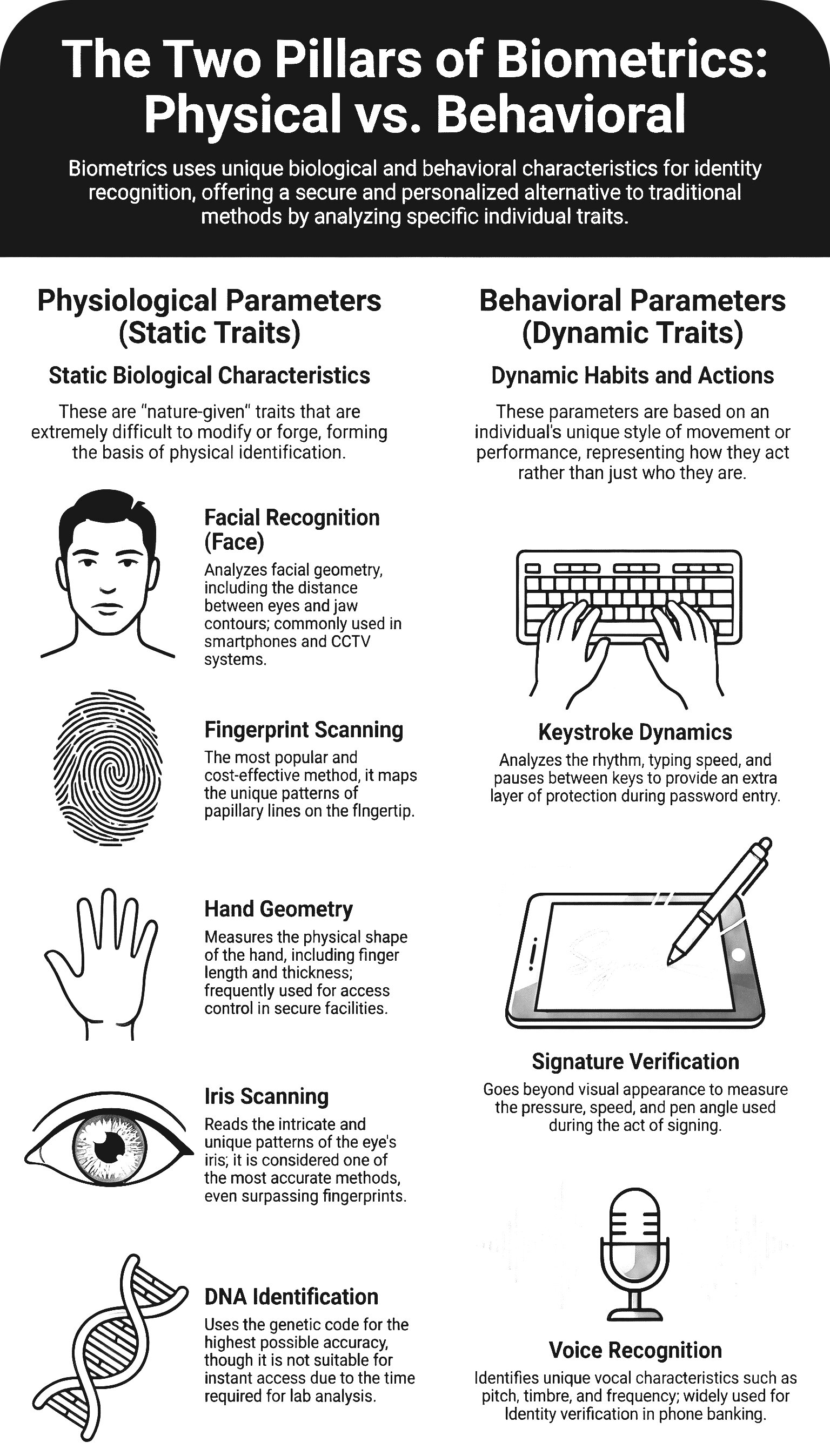
Biometric Verification vs Identification
Verification (1-to-1): The system checks if a person is who they claim to be. It compares live data against a single stored template (e.g., Unlocking a phone with FaceID).
Identification (1-to-many): The system searches an entire database to find a matching template without knowing the identity upfront (e.g., CCTV identifying a suspect in an airport crowd).
3.1 Data Entry: Validation & Verification
To ensure Data Integrity, systems must implement controls at the point of entry to ensure data is both sensible and accurate.
| Method | Technical Definition | Examples |
|---|---|---|
| Validation | Automated checks performed by the computer to ensure that data is sensible and follows specific rules. | Range check (e.g., 1-12 for months), Type check (digits only), Format check, Length check. |
| Verification | Methods used to ensure that the data entered exactly matches the original source document. | Double Entry: Data is typed twice and compared. Visual Check: A human compares the screen data against the paper source. |
Exam Tip: The Difference
Validation can only prove that data is sensible, not that it is correct. For example, if a user enters a wrong but possible date of birth, it will pass Validation but fail Verification.
4. Cryptography & Secure Protocols
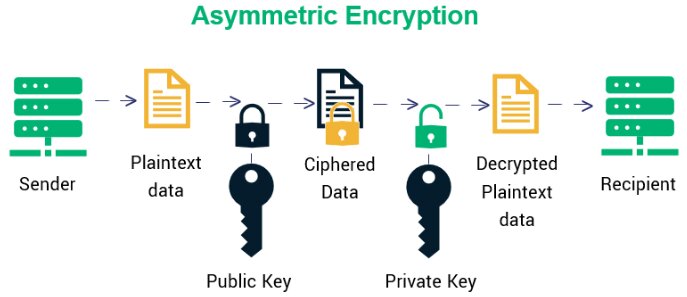
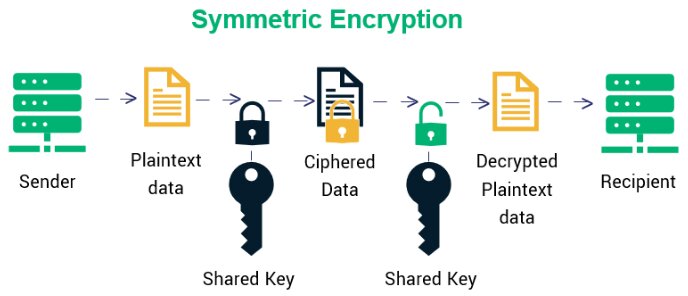
| Encryption Type | Mechanism | Pros & Cons |
|---|---|---|
| Symmetric | Uses a single key to both encrypt and decrypt data. | Fast for large data, but securely sharing the key is risky. |
| Asymmetric | Uses a linked Public Key (to encrypt) and Private Key (to decrypt). | Highly secure for internet transfer, but computationally slower. |
TLS Protocol (Transport Layer Security)
TLS replaces the older SSL to establish encrypted web links (HTTPS). It operates in two layers:
- Handshake Protocol: Website and client authenticate each other and agree on encryption algorithms to establish the secure session.
- Record Protocol: Safely transfers the actual encrypted data over the internet.
5. Data Loss Prevention: Backup vs. Mirroring
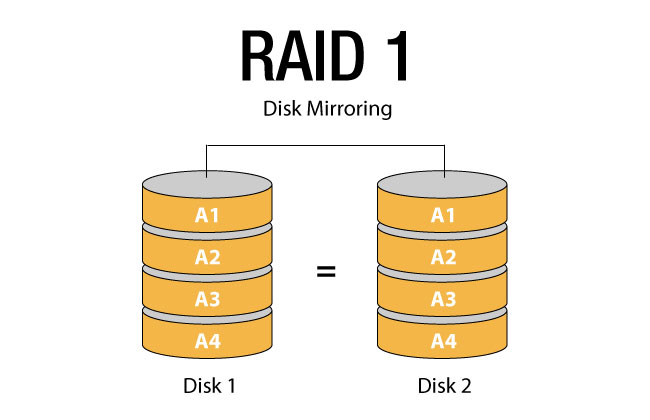
| Feature | Data Backup | Disk Mirroring (RAID 1) |
|---|---|---|
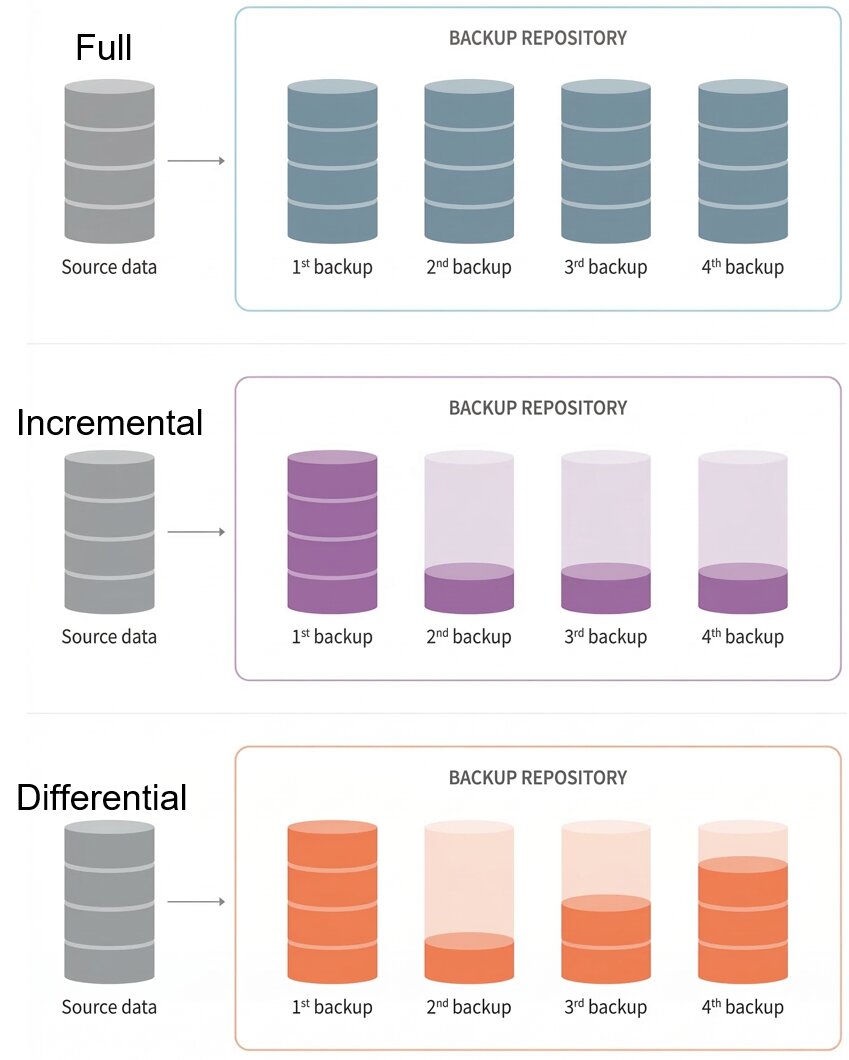
| Definition | A periodic copy of data stored elsewhere (e.g., Incremental or Differential backups). | Writing data simultaneously to two identical hard drives in real-time. |
| Primary Purpose | Recovery from accidental deletion, file corruption, or malware (ransomware). | High availability. Prevents system downtime if a physical hard drive crashes. |
| Protection Limit | Data is only as fresh as the last backup (e.g., yesterday night). | Does not protect against accidental deletion (the mistake is mirrored instantly). |
6. Distributed Ledgers (Blockchain)
A decentralized, distributed, and immutable public ledger that removes the need for a central trusted authority.
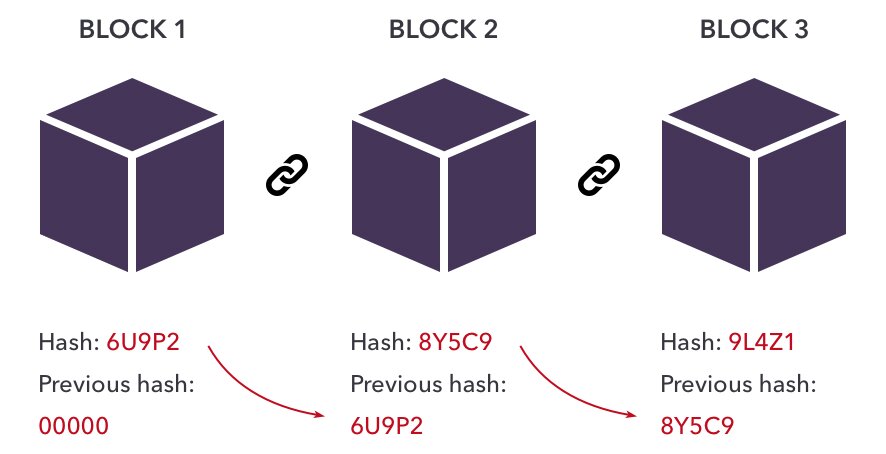
- Distributed Network (P2P): Every node holds a copy of the ledger. There is no single point of failure.
- Immutability via Hashing: Each block contains Data, its own Hash, and the Previous Hash. Altering data breaks the cryptographic chain, requiring computationally impossible recalculations to fake a record.
7. Intellectual Property & Software Models
IP Protection Methods
- Copyright: Protects literary/artistic works and software code from unauthorized distribution.
- Patent: Protects physical inventions or technical processes.
- Trademark: Protects logos, names, and signs distinguishing a brand.
- DRM (Digital Rights Management): Technological locks (encryption/watermarks) used to enforce copyright and prevent piracy.
Software Licensing
| Model | Characteristics |
|---|---|
| Open Source | Source code is public (e.g., GPL, MIT licenses). Anyone can view, modify, and distribute. Usually free, with community support. |
| Commercial (Closed) | Source code is hidden. Requires purchasing a license (EULA). Professional support. |
| Shareware | Closed source, provided free on a trial basis (e.g., 30 days). Requires payment afterward. |
| Freeware | Closed source, but distributed at no monetary cost permanently. |
8. Cloud Computing & E-Government
Cloud computing delivers scalable IT services over the internet, allowing governments to run massive E-Gov platforms (like egov.kz) offering efficiency, transparency, and 24/7 accessibility.
Cloud Deployment Models
- Public Cloud: Hardware owned by a third-party (AWS, Azure) and shared among clients.
- Private Cloud: Infrastructure used exclusively by a single organization, often highly secure.
- Hybrid Cloud: Combines public and private, sharing data between them for flexibility.
Cloud Service Models
| Service Model | Definition & Use Case |
|---|---|
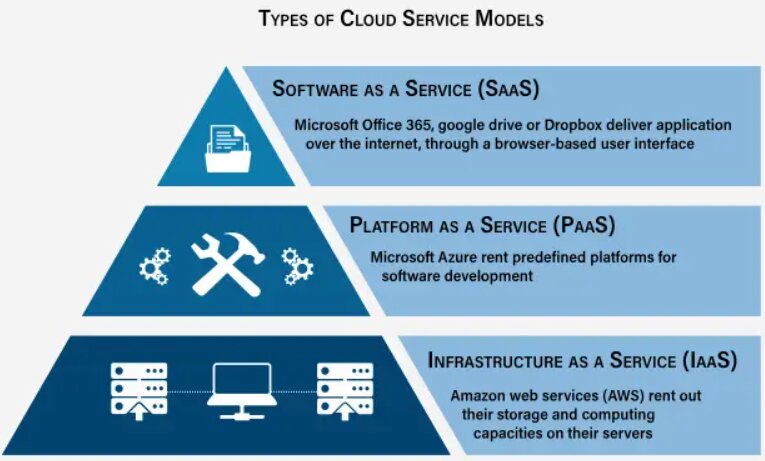
| IaaS (Infrastructure) | Renting basic servers, storage, and VMs. You manage the OS and apps. |
| PaaS (Platform) | Provides a ready environment for developers to build and test software without managing underlying servers. |
| SaaS (Software) | Delivering ready-to-use applications over the web (e.g., Gmail, Microsoft 365). |
Exam-Style Application Tasks
A government agency uses a Private Cloud (IaaS) for confidential citizen records, but wants to move a public-facing informational portal to a Public Cloud (SaaS). Evaluate the security and financial implications of adopting this Hybrid Cloud approach.
A student downloads Shareware software and, after 30 days, modifies the application's binary files to bypass the DRM. Explain which intellectual property laws and fair use principles are being violated.
Compare the use of Biometric Verification versus traditional Knowledge-based authentication (passwords) for accessing an E-Government tax portal. Which provides better security against Phishing attacks, and why?