Data Representation: Number Systems & Floating Point
Data Representation is fundamental to computer science. All data is stored in binary. This revision covers conversions across bases, negative number representation using Two's Complement, and handling fractional data using Fixed and Floating Point structures aligned with Cambridge AS/A Level 9618 standards.
Learning Objectives
- 12.1.1.1 Convert a number from one number system to another
- 12.1.1.2 Explain the advantages of using hexadecimal numbers
- 12.1.1.3 Perform arithmetic operations: addition and multiplication of binary numbers
- 12.1.1.4 Represent positive/negative numbers in two's complement
- 12.1.1.5 Perform subtraction using two's complement
- 12.1.1.6 Use binary numbers with a fixed point
- 12.1.1.7 Represent positive and negative floating-point decimal numbers in binary
Core Theory: Data Representation
1. The Four Number Systems & Conversions
Definition: At the hardware level, data is represented in base-2 (Binary). To make this manageable, computer scientists group bits into base-16 (Hexadecimal) and base-8 (Octal) or use our standard base-10 (Denary).
| System | Base | Digits | Use Case |
|---|---|---|---|
| Denary | 10 | 0–9 | Human counting and basic mathematics. |
| Binary | 2 | 0, 1 | Computer storage, logic gates, and processing. |
| Hexadecimal | 16 | 0–9, A–F | Compact notation (memory dumps, MAC addresses, RGB colors). |
| Octal | 8 | 0–7 | Octal is mainly used for Unix file permissions (like chmod 755) and aviation transponder codes. |
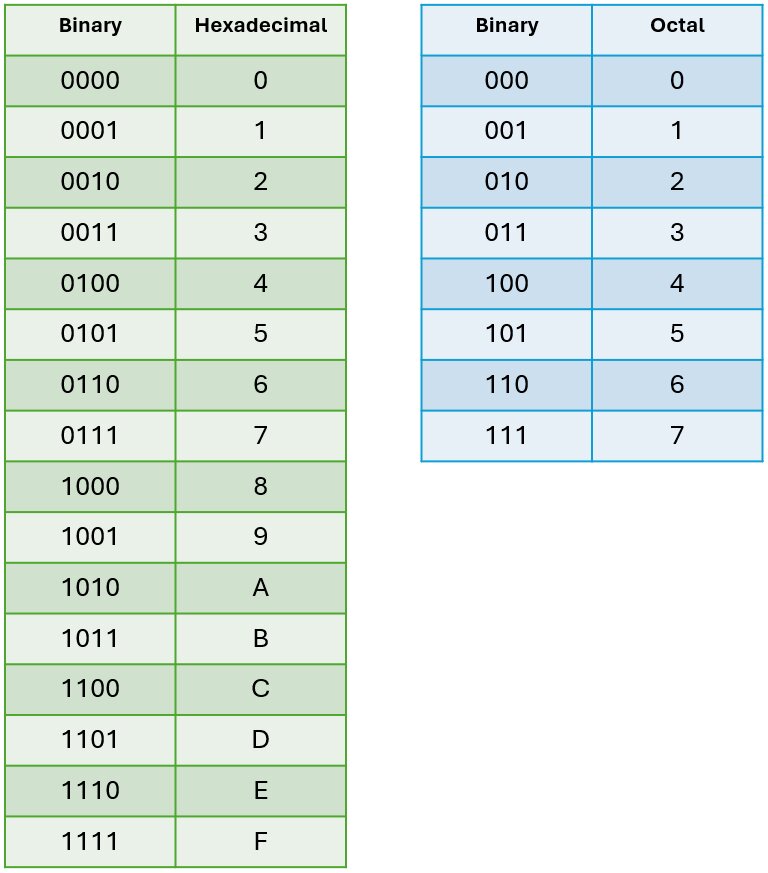
Example: Denary to Binary & Hex
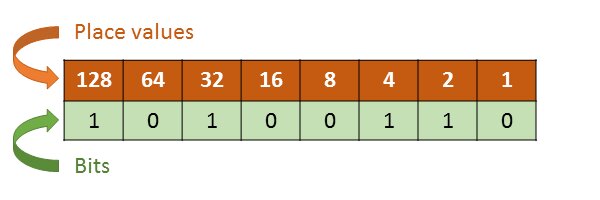
2. Binary Arithmetic & Shifts
Addition: Binary addition works just like decimal addition, but it carries over when the sum exceeds 1. If a calculation requires more bits than the system has allocated (e.g., a 9th bit in an 8-bit system), this is called Overflow, and the extra bit is lost.
Example: Binary Addition
Logical Shifts: Shifting bits is a fast way for processors to perform basic multiplication and division.
- Logical Left Shift: Shifts all bits left, filling the right with 0. Effect: Multiplies the number by 2 per shift.
- Logical Right Shift: Shifts all bits right, filling the left with 0. Effect: Divides the number by 2 (integer division).
Image Description: A diagram showing an 8-bit register. Arrows indicate all bits moving one position to the left (with a 0 entering the empty space on the right) and the reverse process for a right shift, clearly labeling them as "Multiply by 2" and "Divide by 2".
3. Two's Complement & Subtraction
Definition: Two's complement is the standard method for representing negative binary integers. To find it: form the one's complement (flip all 0s to 1s and 1s to 0s) and add 1[cite: 241]. Alternatively, leave the least significant 0s unchanged up to and including the first least significant 1, then complement all remaining bits[cite: 246, 247].
Why: ALUs (Arithmetic Logic Units) in CPUs use adder circuits. By using two's complement, the CPU simply adds a negative number instead of needing a separate subtractor circuit.
Application: To perform A - B, the computer calculates A + (-B). Any carry out of the Most Significant Bit (MSB) during this addition is ignored[cite: 263, 269].
Example: Binary Subtraction
Calculate (1101011)2 - (111010)2[cite: 264].
4. Fixed Point vs. Floating Point
Definition: Fractional numbers can be stored in two ways. Fixed point allocates a static, unchanging number of bits for the integer part and the fractional part. Floating point splits the available bits into a Mantissa and an Exponent[cite: 282, 329, 330], similar to scientific notation.
| Feature | Fixed Point | Floating Point |
|---|---|---|
| Speed | A processor can usually carry out calculations more quickly. | Requires more complex ALU processing. |
| Precision vs Range | Can represent some numbers more precisely. Can represent positive numbers closer to zero. | Can represent a vastly bigger range of numbers within the same number of bits. |
Normalization: To maximize precision and avoid multiple representations of the same number, floating-point numbers are normalized. A positive normalized value always starts with 0.1. A negative normalized value always starts with 1.0. A value is not valid if it is not normalized (e.g., starting with 0.0 or 1.1)[cite: 283, 316, 422].
Representation Errors:
- Underflow: Result is so close to zero that the number stored is zero.
- Rounding (Truncation): A decimal value cannot be represented exactly in the available number of bits.
Example: Evaluating Floating Point
Calculate the decimal equivalent of a normalized floating point number with an 8-bit Mantissa: 01011100 and a 4-bit Exponent: 0101.
Image Description: A block diagram of a 12-bit register split into two sections: an 8-bit Mantissa block (with an implied binary point after the first bit) and a 4-bit Exponent block, clearly showing how bits are partitioned in memory.
Modeling: Floating Point Representation
Demonstration of converting decimal values into normalized floating-point binary (Mantissa and Exponent format).
Worked Examples
1 Hexadecimal to Decimal Conversion
Convert $(88BAE)_{16}$ to decimal format.
= (8 × 16^4) + (8 × 16^3) + (11 × 16^2) + (10 × 16^1) + (14 × 16^0)
= (8 × 65536) + (8 × 4096) + (11 × 256) + (10 × 16) + (14 × 1)
= 524288 + 32768 + 2816 + 160 + 14
= 560046
Result: $(560046)_{10}$.
2 Two's Complement Subtraction
Perform $(1101011)_2 - (111010)_2$ using addition and two's complement.
1. Find 2's complement of subtrahend (0111010 -> 1000110)
2. Add to minuend:
  111       (carry)
  1101011
+ 1000110
---------
 10110001
The carry out of the MSB is ignored. Result is $(110001)_2 = (49)_{10}$.
3 Decimal to Normalized Floating Point
Write the normalized floating point representation of $-6.75$ using an 8-bit mantissa and 4-bit exponent.
1. Fixed point binary for 6.75: 0110.11
2. Two's complement for -6.75: 1001.01
3. Normalize (shift point 3 places left): 1.00101
4. Mantissa (8-bit): 10010100
5. Exponent = 3 (shifted left 3 times) -> Binary: 0011
Mantissa: 10010100, Exponent: 0011
Independent Practice
Formative Assessment
Complete the SAU/SAT revision paper tasks on Data Representation.
- Go to app.formative.com/join
- Enter the Revision Join Code:
892DATA
Pitfalls & Common Errors
Subtraction MSB Carry
When performing binary subtraction using two's complement addition, remember to strictly ignore the final carry bit that exceeds your bit depth.
Unnormalized Floating Point
A floating point number is invalid (unnormalized) if the first two bits of the mantissa are identical (e.g., $00$ or $11$). It must start with $01$ for positive numbers or $10$ for negative numbers.
Graded Tasks
Identify and state the three main types of errors that occur in floating-point calculations (Underflow, Overflow, Rounding).
Explain the effects on a floating-point system if the number of mantissa bits is decreased (e.g., from 8 to 6) and the exponent bits are increased (from 4 to 6). How does this affect range and precision?
Calculate the smallest number of bits that would need to be added to an 8-bit mantissa so that the decimal number $12.765625$ ($1100.110001_2$) can be represented exactly.
Develop the normalized floating-point representation for $-23.25$ using an 8-bit mantissa and 4-bit two's complement exponent.