Open & Closed Source Software
Every piece of software has underlying source code. How that code is distributed and licensed fundamentally changes its security, cost, and how users can interact with it. Understanding the difference between Open Source and Closed Source (Proprietary) is a key business and engineering decision.
Learning Objectives
- 11.1.2.10 Compare open-source and closed-source software.
- 11.1.2.11 Evaluate the benefits and drawbacks of each approach for different scenarios.
Expert Explanation: Open vs Closed Source
Conceptual Anchor
The Recipe Analogy
Open Source is like a recipe published online. Anyone can read it, cook it, add their own spices, and republish the improved version. The community makes it better over time.
Closed Source is like the secret formula for Coca-Cola. You can buy the drink (use the software), but the company keeps the recipe locked in a vault. You cannot see how it's made or change its flavor.
Rules & Theory
Open-Source Software (OSS)
Software where the source code is made freely available to the general public. It can be viewed, modified, and redistributed.
- Examples: Linux OS, Mozilla Firefox, Android, Python, WordPress.
- Development: Collaborative. Maintained by a community of volunteers and sponsored developers.
Closed-Source (Proprietary) Software
Software where the source code is securely hidden. Users pay for a license to execute the compiled software, but they cannot see or alter the underlying code.
- Examples: Microsoft Windows, macOS, Adobe Photoshop, Microsoft Office.
- Development: In-house. Developed, tested, and maintained exclusively by the company that owns it.
Open Source community vs Proprietary company development model
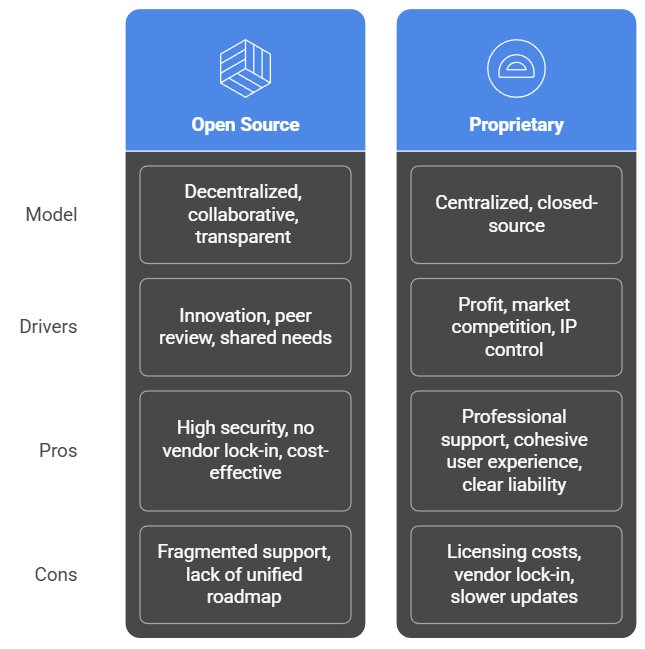
Detailed Comparison
| Feature | Open Source | Closed Source (Proprietary) |
|---|---|---|
| Cost | Usually free of charge. | Usually requires purchasing a license or subscription. |
| Source Code | Accessible to anyone to read, edit, and share. | Hidden. Only compiled, executable files are provided. |
| Support | Relies on community forums, wikis, and user groups. Can be slow. | Guaranteed professional support, helplines, and regular official updates. |
| Customization | Highly customizable. You can change the code to suit your exact needs. | Limited to the settings provided by the developer. Cannot alter core functions. |
| Security | "Many eyes" principle: thousands of developers can spot and fix bugs quickly. | Relies on the vendor's internal team to find and patch vulnerabilities. |
Licenses in Open Source
Open source does NOT mean "no rules". Developers use specific licenses to control how their code is used:
GNU GPL
If you modify and release code based on GPL software, your new software must also be open source.
MIT License
Very permissive. You can take the open source code, modify it, and sell it as a closed-source proprietary product.
Common Pitfalls
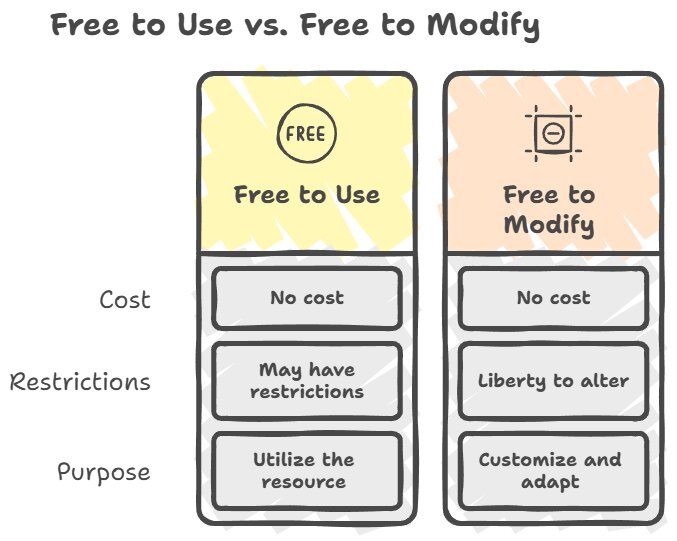
"Freeware is Open Source" (FALSE)
Many students confuse these terms. Freeware means the software costs $0 (like Skype or Adobe Acrobat Reader), but the source code is still strictly Closed. You cannot modify Skype's code. Open Source is about the freedom to access the code, not just the price.
"Open Source is more easily hacked"
A common misconception. While hackers can see the code to find flaws, so can thousands of "good" security experts who often fix vulnerabilities much faster than a small corporate team. Both systems have security pros and cons.
Worked Examples
1 Scenario: Choosing an Operating System
Scenario: A hospital needs to install an Operating System on 500 computers. They have two options: Linux (Open Source) or Windows (Proprietary).
Analysis:
- Linux (Open Source): Would save hundreds of thousands of dollars in licensing fees. The IT department could customize the OS to perfectly fit the hospital's network. However, they must hire specialized Linux administrators, and if a critical failure occurs, there is no official "help desk" to sue or call for guaranteed immediate support.
- Windows (Proprietary): Very expensive up-front cost. However, it offers guaranteed professional support from Microsoft, regular automated security updates, and out-of-the-box compatibility with most medical software.
Tasks
State two key characteristics of proprietary software.
Explain the difference between Freeware and Open Source software. Give one example of each.
A small tech startup wants to build a new web application but has a limited budget. Explain why using open-source frameworks (like React or Django) is a logical choice.
A government military branch needs a highly secure communication app. Evaluate whether they should use an existing open-source solution or hire a company to build a closed-source proprietary app.
Self-Check Quiz
Q1: In which type of software is the user purchasing a license to USE the software, rather than owning the code?
Q2: If an open-source program breaks, who do you call for official, guaranteed customer support?
Q3: True or False: You are legally allowed to take an open-source program, modify its code, and redistribute it.