Paper 1 — Theory Crash Course
Complete exam study guide covering all Paper 1 learning objectives. Every topic includes precise definitions, worked examples from past papers (2023–2025), step-by-step rules, examiner-ready answers, and warnings about the most penalised mistakes.
How to use this guide
- ⚠️ WARNING Common mistake — marks lost here
- 📌 DEFINITION Technical term — learn exactly as written
- 📋 RULE Step-by-step algorithm or procedure
- ✅ EXAM TIP Ready-made answer aligned to mark scheme
- 🖼️ IMAGE Placeholder — find and insert this diagram
Contents
- Ch.1 — Data & Information
- 1.1 Number Systems
- 1.2 Binary Arithmetic
- 1.3 Two's Complement
- 1.4 Fixed-Point
- 1.5 Floating-Point
- 1.6 Security/Privacy/Integrity
- 1.7 Backup vs Mirroring
- 1.8 Encryption
- 1.9 Verification vs Validation
- 1.10 Protection Measures
- 1.11 Open vs Closed Source
- Ch.2 — Computer Systems
- 2.1 OS Functions
- 2.2 OS Types
- 2.3 User Interfaces
- 2.4 Registers & System Bus
- 2.5 RISC vs CISC
- 2.6 FDE Cycle
- 2.7 CPU Performance
- 2.8 RAM vs ROM
- 2.9 Virtual Memory
- 2.10 Addressing Modes
- 2.11 Paging & Segmentation
- 2.12 Virtual Machines
- Ch.3 — AI & Programming
- 3.1 AI Applications
- 3.2 VR vs AR
- 3.3 PL Generations
- 3.4 Compilers vs Interpreters
- 3.5 Declarative vs Imperative
- 3.6 Compilation Stages
- Ch.4 — Networks
- 4.1 LAN vs WAN
- 4.2 Topologies
- 4.3 Network Hardware
- 4.4 Packet vs Circuit
- 4.5 OSI Model
- 4.6 WWW/Internet/Intranet
- 4.7 DNS & URL
- 4.8 MAC Addresses
- 4.9 Protocols
- 4.10 IP Addresses
- Appendix
- A — Command Words
- B — Topic Frequency
- C — All Warnings
Chapter 1 — Data and Information
1.1 Number Systems
📌 Binary (Base-2)
A positional number system using only 0 and 1, where each position represents a power of 2. Used because transistors represent exactly two states: on (1) and off (0).
📌 Hexadecimal (Base-16)
Uses 16 symbols (0–9 and A–F) where each single digit represents exactly 4 binary bits (one nibble). A=10, B=11, C=12, D=13, E=14, F=15.
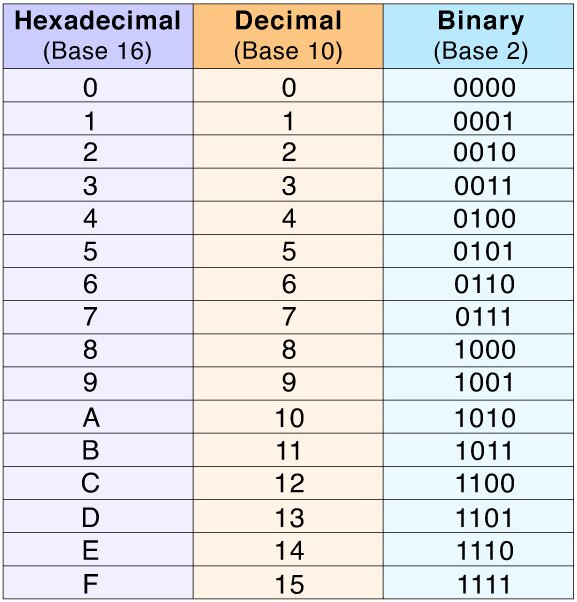
✅ Exam Tip — "Explain advantages of hexadecimal" (LO 12.1.1.2)
- Shorter and easier to read than binary — fewer digits to write
- Easy conversion: group exactly 4 binary bits → 1 hex digit; no arithmetic
- Less prone to human error when working with memory addresses
- Widely used by programmers to represent binary values compactly
📋 Rule — Denary → Hexadecimal
- Divide denary by 16. Record remainder (≥10 → convert: 10=A…15=F).
- Divide quotient by 16 again. Record remainder.
- Repeat until quotient = 0. Read remainders bottom to top.
★ Worked Examples — 2024 & 2025 Papers
92₁₀ → Hex:  92÷16=5 rem 12(C); 5÷16=0 rem 5  → 5C₁₆
183₁₀ → Hex: 183÷16=11 rem 7; 11÷16=0 rem 11(B) → B7₁₆ (2025 Q1a)1.2 Binary Arithmetic
📋 Binary Addition Rules
0+0=0 | 0+1=1 | 1+1=0 carry 1 | 1+1+1=1 carry 1⚠️ Warning — 8-bit Overflow
If addition produces a 9th bit, it is discarded in 8-bit arithmetic. Always show the carry explicitly — mark scheme awards separate marks for showing overflow AND correct 8-bit result.
★ 2025 Paper Q1b — 10101010 + 10111001
  10101010
+ 10111001
----------
1 01100011  ← overflow bit discarded
8-bit result: 01100011
📋 Binary Multiplication (Shift-and-Add)
- For each bit of multiplier (right to left): if bit=1, write multiplicand shifted left by that position; if bit=0, write zeros.
- Add all partial products using binary addition.
★ 2025 Paper Q1c — 1111 × 111
       1111   (×1, shift 0)
      11110   (×1, shift 1)
     111100   (×1, shift 2)
   ---------
    1101001   = 105₁₀ ✓
1.3 Two's Complement
📌 Two's Complement
Signed binary integer representation where the MSB has negative place value −2^(n−1). All other bits carry normal positive values. To negate: invert all bits, then add 1.
📋 Converting –n to 8-bit Two's Complement
- Write +n as 8-bit binary (pad with zeros).
- Invert all bits → one's complement.
- Add 1 to the result.
★ 2024 Paper Q1b — Represent –15 as 8-bit two's complement
Step 1: +15 = 0000 1111
Step 2: Invert → 1111 0000
Step 3: Add 1 → 1111 0001  ✓
✅ Range of n-bit Two's Complement
- Min: −2^(n−1) Max: +2^(n−1) − 1
- 8-bit: −128 to +127
📋 Binary Subtraction A − B
- Convert B to two's complement (= −B).
- Add A + (−B) using binary addition.
- Discard any carry beyond 8 bits. Remaining 8 bits = A−B.
★ 2024 Paper Q1c — 23₁₀ − 14₁₀
−14: 0000 1110 → invert → 1111 0001 → +1 → 1111 0010
  0001 0111  (+23)
+ 1111 0010  (−14)
-----------
1 0000 1001  → discard overflow → 0000 1001 = 9₁₀ ✓
1.4 Fixed-Point Binary Fractions
📌 Fixed-Point Representation
Binary point at a fixed position. Left bits = positive powers of 2. Right bits = 2⁻¹=0.5, 2⁻²=0.25, 2⁻³=0.125.
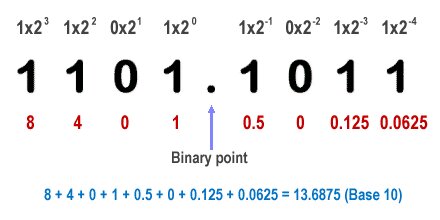
📋 Denary Fraction → Binary (Multiply-by-2)
- Multiply fractional part by 2. Record integer part (0 or 1).
- Repeat with remaining fractional part.
- Read bits top to bottom.
★ 0.75₁₀ → .11₂ and 0.625₁₀ → .101₂
0.75:  0.75×2=1.50→1 | 0.50×2=1.00→1  =  .11₂
0.625: 0.625×2=1.25→1 | 0.25×2=0.50→0 | 0.50×2=1.00→1  =  .101₂
✅ 2025 Q1d-iii — Byte as fixed-point (3 fractional bits)
Byte 1 0 1 1 1 0 0 0: integer = 10110=22; fractional = 001=0.125 → Answer: 22.125
1.5 Floating-Point & Normalisation
📌 Floating-Point
Stores a real number as mantissa (significant digits) and exponent (power of 2 scaling the mantissa). Far wider range than fixed-point.
📌 Normalisation Rule
Positive normalised: mantissa starts 0.1... | Negative normalised: mantissa starts 1.0... — ensures maximum precision.
📋 Positive Denary → Normalised Floating-Point
- Convert integer part to binary.
- Convert fractional part (multiply-by-2).
- Write combined: integer.fraction₂
- Normalise: shift point left until mantissa =
0.1xxxxxxx - Count shifts = positive exponent.
- Express exponent in two's complement.
- Write mantissa bits padded to required length.
★ 2023 Paper Q1d — 17.75₁₀ (10-bit mantissa, 6-bit exponent)
17=10001₂  |  0.75=.11₂  →  10001.11₂
Normalise: 0.100011100 × 2⁵  (shift 5 left)
Exponent +5 = 000101 (6-bit two's complement)
Mantissa (10 bits): 0100011100
★ 2025 Paper Q1e — −23.75₁₀ (mark scheme)
23=10111₂  |  0.75=.11₂  →  10111.11₂  |  Exponent=+5 → 0101
Mantissa (12 bits): 101000010000  |  Exponent (4 bits): 0101
⚠️ Warning — Non-Normalised Mantissa
Mantissa 0.01... is NOT normalised — wastes a bit of precision. First bit AFTER binary point MUST be 1 (positive) or 0 (negative). Examiner checks this explicitly.
1.6 Security vs. Privacy vs. Data Integrity
📌 Data Security
Technical measures protecting data from unauthorised access, loss, or damage. Security = HOW data is protected.
📌 Data Privacy
Legal/ethical rights governing WHO may view, access, share, or sell personal data.
📌 Data Integrity
Assurance that data is accurate, complete, and unaltered. Integrity = WHETHER data is correct.
⚠️ Three Completely Separate Concepts
Security=HOW. Privacy=WHO. Integrity=WHETHER. Writing "security means keeping data private" or "integrity means protecting from hackers" scores zero. The examiner marks each definition independently.
✅ "State two differences: data security vs data integrity" (2025 Q2a)
- Integrity deals with validity/accuracy; security deals with protection from unauthorised access.
- Security prevents unauthorised access; integrity prevents human error or corruption during data entry.
1.7 Data Backup vs. Disk Mirroring
📌 Data Backup
A periodic copy made at a specific point in time, stored separately (offline/off-site/cloud). Allows recovery to any previous state.
📌 Disk Mirroring (RAID 1)
All write operations simultaneously duplicated to a second physical disk in real time. Hardware redundancy only — no historical copies.
| Feature | Data Backup | Disk Mirroring |
|---|---|---|
| Timing | Periodic (daily/weekly) | Instantaneous — real time |
| Historical copies | ✓ Yes | ✗ No — current state only |
| Hardware failure | ✓ Yes | ✓ Yes |
| Accidental deletion | ✓ Yes | ✗ No — mirrored instantly |
| Ransomware attack | ✓ Yes | ✗ No — encrypted files mirrored |
| Virus spread | ✓ Yes | ✗ No — spreads to mirror |
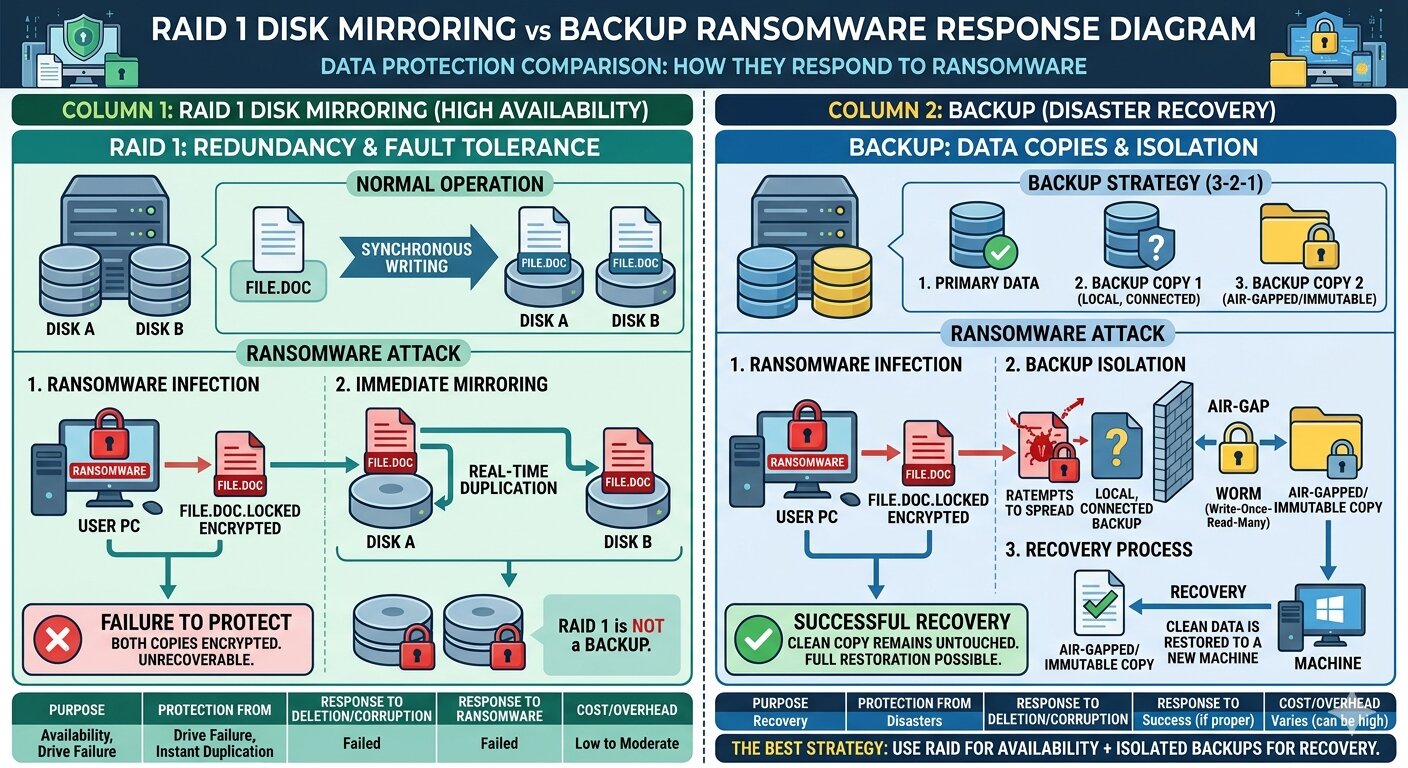
⚠️ Disk Mirroring is NOT a Backup — Most Penalised Error
Any answer stating "mirroring IS a type of backup" scores zero. Ransomware, deletion, virus = instantly replicated to second drive. Only offline backup preserves clean historical data.
✅ "Consequence of absence of disk mirroring" (2025 Q2b-ii — any one)
- A failed drive cannot be replaced while the computer is running
- A virus attacking one disk will spread to the mirrored disk
- Accidental deletion on one disk causes deletion on the other
1.8 Encryption & Access Rights
📌 Encryption
Converting plaintext into unreadable ciphertext using a mathematical algorithm and key. Only a party with the correct decryption key can recover the original data.
Image to insert
Plaintext → [Encryption+Key] → Ciphertext → (network) → [Decryption+Key] → Plaintext. Хакер перехватывает — видит только ciphertext.
Поиск: "encryption decryption process diagram key ciphertext"✅ "Describe how encryption keeps information secure" (2025 Q2c — 2 marks)
- Data converted using algorithm and key into ciphertext unreadable without the correct decryption key.
- Secures data while in transit (online transactions, email, file transfers) so intercepted data cannot be read.
📌 Access Rights
Permissions assigned to users/processes defining which resources they may read, write, execute, or delete. Implements the principle of least privilege.
✅ "Two measures to protect confidential data" (2024 Q2a — any two)
- Encrypting data
- Granting limited access rights to authorised users only
- Blocking access from certain IP locations
- Keeping logs of all user entries
1.9 Verification vs. Validation
📌 Data Verification
Checking that data entered accurately matches the original source document. Checks whether data was copied correctly — NOT whether it is true.
📌 Data Validation
Automatic check that data is reasonable, sensible, and follows predefined rules. Cannot determine whether data is actually true.
⚠️ Validation Does NOT Check if Data is True
Validation confirms "Age: 25" is a positive integer within range. It cannot confirm this is the person's real age. Writing "validation checks if data is correct/true" = zero marks. Reward words: "reasonable" or "follows the rules."
Image to insert
Слева: Verification — двойной ввод пароля. Справа: Validation — Range Check для поля Age (0–120).
Поиск: "data validation vs verification examples comparison"✅ "Define data verification" (2024 Q2b — 2 marks)
- Computer ensures data input matches the original source document.
- Done by double entry or on-screen checking — two entries compared.
| Validation Method | Checks | Example |
|---|---|---|
| Range check | Value within min–max | Age 0–120; month 1–12 |
| Type check | Correct data type | Age must be integer not "twenty" |
| Presence check | Required field not empty | Name cannot be blank |
| Format check | Matches defined pattern | Date must be DD/MM/YYYY |
| Length check | Within character limit | Password 8–20 characters |
| Check digit | Mathematical verification | ISBN, barcode, credit card |
1.10 System Protection Measures
Image to insert
Инфографика: Firewall, Biometrics, Anti-virus, Encryption, 2FA, Physical lock, Strong password — каждая с иконкой и 1 строкой.
Поиск: "cybersecurity protection measures icons infographic"| Measure | Definition | Protects against |
|---|---|---|
| Firewall | Monitors and filters network traffic by predefined rules | Unauthorised network intrusion |
| Biometrics | Authentication via fingerprint, retina, facial recognition | Unauthorised physical/logical access |
| Anti-virus | Detects and removes malware by signature comparison | Viruses, trojans, worms |
| Encryption | Converts data to ciphertext readable only with key | Data theft in transit/storage |
| 2FA | Two forms of verification (password + OTP) | Account compromise |
| Access rights | Per-user read/write/execute permissions | Privilege escalation |
⚠️ Anti-Cracking ≠ General Security
Backup, firewall, antivirus are NOT accepted as "ways to protect against cracking." Required: two-factor authentication, password complexity, SSL/HTTPS, encryption, password hashing, login monitoring.
1.11 Open-Source vs. Closed-Source
📌 Open-Source Software
Released under a licence permitting each recipient to view, copy, modify, and redistribute the source code without paying a fee.
📌 Closed-Source (Proprietary) Software
Source code protected as intellectual property and not released to users. Only compiled executable available under a licence agreement.
⚠️ Open-Source ≠ Free to Download
Open-source means the source code is legally accessible. Marks awarded for mentioning "source code licence" and "right to copy/modify/redistribute" — NOT merely "it's free."
Open-Source
- Source code accessible ✓
- Usually free
- User may modify (under licence)
- Community support
- Linux, Firefox, Python
Closed-Source
- Source code protected ✗
- Usually requires payment
- User cannot modify
- Dedicated vendor support
- Windows, Photoshop, iOS
✅ "Describe open-source software" (2024 Q3a-i — 2 marks)
- Released under a licence permitting each recipient to copy and modify the software.
- Does not require a fee or royalty for the right to copy, modify, or distribute.
Chapter 2 — Computer Systems
2.1 Operating System — Functions
📌 Operating System
System software managing hardware resources, providing a platform for applications, and acting as intermediary between the user and hardware.
Image to insert
Пирамида: Hardware → OS → Application Software → User. Двусторонние стрелки.
Поиск: "operating system layer diagram hardware OS application user"✅ "Explain two functions of an OS" (1 mark each)
- Memory management: allocates RAM; manages virtual memory; handles paging/segmentation
- Processor management: schedules processes; enables multitasking
- Device management: controls I/O via device drivers
- User account management: manages profiles, access rights, authentication
- Interrupt handling / Error handling / Security
2.2 Types of Operating Systems
Image to insert
Три карточки: RTOS (монитор+дедлайн), NOS (сервер+клиенты), Batch OS (стопка заданий).
Поиск: "real-time network batch operating system types"| OS Type | Definition | Key Feature | Applications |
|---|---|---|---|
| Real-Time OS (RTOS) | Guarantees processing within strict time deadlines | Missing deadline = system failure | Pacemakers, aircraft, ABS, robots |
| Network OS (NOS) | Manages network resources; centralised services to clients | Centralised auth and access rights | Windows Server, Linux server |
| Batch Processing OS | Groups similar jobs; processes without user interaction | No real-time interaction; jobs sorted first | Payroll, bank statements, simulations |
✅ "How NOS implements user account management" (2025 Q3b)
- Provides authentication and authorisation — only authorised users access resources.
- Verifies user identities and assigns appropriate access rights based on account role.
2.3 User Interfaces
Image to insert
Четыре иллюстрации: GUI (рабочий стол), CLI (терминал), Natural Language (голосовой), Gesture (рука).
Поиск: "user interface types GUI CLI natural language gesture"| Interface | Advantages | Disadvantages |
|---|---|---|
| GUI | Intuitive; no commands to memorise; easy for beginners | Requires more RAM/CPU; slower for experts; unsuitable for server management |
| CLI | Fast for experts; minimal resources; precise; scriptable | Steep learning curve; must memorise commands; damaging typing errors |
| Natural Language | No technical knowledge; natural interaction | Ambiguous; misinterprets colloquialisms; limited technical vocabulary |
| Gesture Recognition | Intuitive; useful for VR/touchscreens | Misinterpreted; limited commands; physically tiring |
✅ "Advantage and disadvantage of CLI for server" (2024 Q4b)
Advantage: Server does not need a GUI, saving computing resources / can run complex commands quickly.
Disadvantage: Difficult for novices / must know exact commands / easy to make damaging errors.
2.4 CPU Registers & System Bus
| Register | Full Name | Purpose |
|---|---|---|
| PC | Program Counter | Holds address of next instruction to be fetched |
| MAR | Memory Address Register | Holds memory address currently being read from/written to |
| MDR | Memory Data Register | Temporarily holds data just fetched from, or about to be written to, memory |
| CIR | Current Instruction Register | Holds instruction currently being decoded and executed |
| ACC | Accumulator | Holds results of ALU arithmetic/logic operations |
📌 Data Bus
Bidirectional — carries actual data/instruction content between CPU, memory, and I/O.
📌 Address Bus
Unidirectional (CPU→Memory) — carries memory address specifying which location to access. Width = max addressable locations (2ⁿ).
📌 Control Bus
Bidirectional — carries read/write commands, clock pulses, interrupt signals coordinating all components.
Image to insert
CPU (ALU, CU, Registers) ↔ три шины ↔ Main Memory. Address Bus — однонаправленный; Data и Control Bus — двунаправленные.
Поиск: "CPU system bus address data control diagram"✅ "Names and purposes of buses" (2024 Q5a — 6 marks)
- Data bus — carries actual data/information; bidirectional
- Address bus — carries where data is sent/collected (memory address)
- Control bus — dictates read or write; carries control signals to components
2.5 RISC vs. CISC Architecture
📌 RISC (Reduced Instruction Set Computer)
Small set of simple, fixed-length instructions, each typically in one clock cycle. Memory access = LOAD/STORE only.
📌 CISC (Complex Instruction Set Computer)
Large set of complex, variable-length instructions, many requiring multiple cycles. Can directly access memory.
Image to insert
Сравнительная таблица: RISC (смартфон/ARM) vs CISC (десктоп/Intel). Ключевые различия выделены.
Поиск: "RISC vs CISC comparison infographic ARM Intel"| Feature | RISC | CISC |
|---|---|---|
| Instruction set | Small, fixed-length | Large, variable-length |
| Cycles per instruction | Typically one | Often multiple |
| Memory access | Only LOAD/STORE | Many instructions access memory |
| Registers | Many general-purpose | Fewer |
| Power consumption | Lower ✓ | Higher |
| Primary use | Mobile, tablets (ARM) | Desktop, servers (Intel x86) |
⚠️ Never say "RISC is faster" without qualification
Always compare BOTH architectures in the same sentence: "Unlike RISC which uses a small set of fixed simple instructions completing in one cycle, CISC uses a large set of complex variable-length instructions requiring multiple cycles."
★ 2024 Q5b — RISC vs CISC tick-table (mark scheme)
| Statement | RISC | CISC |
|---|---|---|
| Complex instruction set | ✓ | |
| Fixed format of instruction | ✓ | |
| Used in tablets and mobile devices | ✓ | |
| Uses LOAD and STORE in memory-to-memory interaction | ✓ | |
| Storing an instruction requires multiple sets of registers | ✓ |
2.6 Fetch-Decode-Execute Cycle
📌 FDE Cycle
Fundamental repeating CPU sequence: fetch next instruction from memory, decode it, execute it — then repeat.
📋 Register Notation
[X] = "contents of register X" | [[MAR]] = "data at address stored in MAR" | ← = "receives"Image to insert
FDE цикл с регистрами: PC→MAR→Memory→MDR→CIR→CU→ALU. Fetch=синий, Decode=жёлтый, Execute=зелёный.
Поиск: "fetch decode execute cycle diagram registers" / mr-tea.net → fetch-execute.html| Phase | Step | Notation | Meaning |
|---|---|---|---|
| FETCH | 1 | MAR ← [PC] | Address of next instruction → MAR |
| 2 | PC ← [PC] + 1 | PC incremented to next instruction | |
| 3 | MDR ← [[MAR]] | Instruction at address in MAR → MDR | |
| DECODE | 4 | CIR ← [MDR] | Instruction copied to CIR |
| 5 | CU decodes [CIR] | Control Unit interprets opcode and operand | |
| EXECUTE | 6 | ALU / I/O / memory op | Decoded instruction is carried out |
⚠️ Three Errors from 2024 Paper Q5c
| Step | Wrong | Correct | Why |
|---|---|---|---|
| 1 | MDR ← [PC] | MAR ← [PC] | PC address → MAR (address reg), NOT MDR (data reg) |
| 2 | PC ← [PC] + 2 | PC ← [PC] + 1 | PC increments by 1, not 2 |
| 4 | CIR ← [MAR] | CIR ← [MDR] | Content is in MDR; MAR only holds addresses |
2.7 CPU Performance Factors
| Factor | Definition | Effect of increasing |
|---|---|---|
| Clock speed | Number of FDE cycles per second (GHz) | More instructions/sec; ⚠️ more heat → overheating |
| Bus width | Bits carried simultaneously on a bus | More data per transfer; wider address bus = more addressable memory |
| Word length | Bits CPU processes in a single operation | More data per instruction → faster computation |
| Cache size | High-speed memory between CPU and RAM | More data at CPU speed → fewer slow RAM accesses |
| Cores | Independent processing units on one chip | Parallel threads → better multitasking |
✅ "Effect of increasing clock speed" (2024 Q5d — 3 marks)
- Instructions performed more quickly / FDE cycle happens faster.
- More calculations/operations executed per second.
- Increased heat generation may cause device to malfunction or overheat.
✅ "Factors affecting CPU performance" (2025 Q4b — 6 marks)
- Clock speed — number of cycles performed by CPU per second
- Bus width — number of bits a bus can carry at one time
- Word length/size — number of bits CPU can process at a time
Do NOT accept "increasing RAM" or "software."
2.8 RAM vs. ROM
📌 RAM (Random Access Memory)
Volatile primary memory — read and write. Contents lost when power removed. Holds running OS, apps, user data.
📌 ROM (Read-Only Memory)
Non-volatile primary memory — read only. Contents retained without power. Holds BIOS, bootloader, firmware.
✅ "Why embedded systems need RAM" (2024 Q6a — 2 marks)
- To store user input (e.g., spin speed and washing programme for a washing machine).
- To manage the user interface and interaction between user and appliance.
2.9 Virtual Memory & Cache
📌 Virtual Memory
OS technique using secondary storage (HDD/SSD) as RAM extension. Inactive pages moved to swap space on disk, freeing RAM for active use.
📌 Cache Memory
Small, very high-speed memory between CPU and RAM, storing copies of frequently used data to reduce average access time.
Image to insert
Иерархия памяти: L1 Cache → L2 → L3 → RAM → HDD/SSD. Цветовой градиент: красный=быстро/мало → синий=медленно/много.
Поиск: "memory hierarchy pyramid L1 L2 cache RAM storage"✅ "Purpose of virtual memory"
- Frees up RAM when insufficient physical memory is available.
- Increases apparent memory beyond physical RAM limits.
- Allows multiple large applications to run simultaneously.
2.10 Memory Addressing Modes
📌 Immediate
Operand IS the actual value. No lookup. ADD #10 — adds 10 directly to accumulator.
📌 Direct
Operand is the memory ADDRESS containing the value. One lookup. ADD A — fetches value at address A.
📌 Indirect
Operand gives address containing ANOTHER address, where value resides. Two lookups. ADD (A)
📌 Indexed
Effective address = operand + Index Register. ADD A+Index
Image to insert
Четыре мини-диаграммы: Immediate (значение в инструкции→AC), Direct (1 стрелка), Indirect (2 стрелки), Indexed (сложение адресов).
Поиск: "memory addressing modes diagram immediate direct indirect indexed"✅ 2024 Q6b — Match answers
| Mode | Definition | Example |
|---|---|---|
| Immediate | B — operand gives the actual value | F — ADD #10 |
| Direct | A — operand gives address storing the value | D — ADD A |
| Indirect | I — operand gives address of register with another address | G — ADD (A) |
| Indexed | E — address = operand + index register | C — ADD A+Index |
✅ 2025 Q4c — Values loaded into AC (LOAD 15, Index=70)
| Mode | Value | Why |
|---|---|---|
| Immediate | 15 | Operand value itself |
| Direct | 25 | Value at address 15 |
| Indirect | 35 | Value at address stored in address 15 (→25→35) |
| Indexed | 30 | Value at address 15+70=85 |
2.11 Paging & Segmentation
📌 Paging
Divides virtual address space into fixed-size pages and physical memory into equal-size frames. Page table maps pages to frames.
📌 Segmentation
Divides memory into variable-size logical segments (code, data, stack) each with a base address and length.
Image to insert
Пагинация: Virtual Address Space (Pages 0–3) ↔ Page Table ↔ Physical Memory (Frames, не по порядку).
Поиск: "paging memory management diagram page table frames"Paging
- Fixed block size
- Internal fragmentation
- Transparent to programmer
- Supports virtual memory ✓
Segmentation
- Variable block size
- External fragmentation
- Logical program structure
- Partially visible to programmer
✅ "Explain how paging is used" (2025 Q5a — 3 marks)
- Enables processes to share physical memory efficiently.
- Breaks virtual space into fixed-size pages; physical memory into same-size frames.
- Page table maps pages to frames; inactive pages swapped to disk (virtual memory).
2.12 Virtual Machines
📌 Virtual Machine (VM)
Software emulation of a physical computer running its own OS and applications in complete isolation from the host.
📌 Hosted VM (Type 2)
Runs on top of a host OS. Hypervisor is an application within the host OS. Lower performance.
📌 Unhosted / Bare-Metal (Type 1)
Runs directly on hardware — no host OS. Higher performance. Used in enterprise/data centres.
Image to insert
Type 1: Hardware→Hypervisor→VM1,VM2. Type 2: Hardware→Host OS→Hypervisor→VM1,VM2.
Поиск: "type 1 vs type 2 hypervisor bare metal hosted diagram"✅ "Two examples of VM use" (2025 Q5b — any two)
- Server virtualisation
- Software testing and development
- Legacy application support
- Disaster recovery and backup
- Cloud computing
Chapter 3 — AI & Programming
3.1 AI Applications
📌 Artificial Intelligence
Simulation of human cognitive processes — learning, reasoning, problem-solving, perception, language — by computer systems.
⚠️ Never Name Software Without Describing Purpose
Mark scheme: "Do not accept name of software without purpose/description." "ChatGPT" = zero. Write: "AI systems that analyse medical imaging to detect disease."
Image to insert
Пять секций с иконками: Медицина, Образование, Игры, Промышленность, Общество. Для каждой — 2 примера с описанием.
Поиск: "AI applications sectors infographic medicine gaming education"| Sector | Examples (must include purpose) |
|---|---|
| Medicine | Disease diagnosis; medical imaging interpretation (X-ray/MRI); drug discovery; personalised treatment plans |
| Education | Adaptive learning platforms; automated marking; intelligent tutoring systems |
| Gaming | NPC intelligent behaviour; procedural content generation; player behaviour analysis |
| Industry | Predictive maintenance; quality control vision systems; robotic assembly |
| Society | Predictive crime analytics; social media moderation; smart city traffic management |
3.2 VR vs. AR
📌 Virtual Reality (VR)
Completely replaces the user's real-world view with a computer-generated environment. Real world entirely blocked out.
📌 Augmented Reality (AR)
Overlays digital information onto the existing real-world view. Real world remains visible and is enhanced.
Virtual Reality (VR)
- Real world: BLOCKED OUT ✗
- Enclosed VR headset
- Fully immersive
- Gaming, training, therapy
Augmented Reality (AR)
- Real world: VISIBLE ✓ + enhanced
- Smartphone, AR glasses
- Partially immersive
- Navigation, surgery, Pokémon GO
Image to insert
Слева: VR шлем — только цифровой мир. Справа: смартфон — реальный мир + цифровые объекты поверх.
Поиск: "virtual reality vs augmented reality comparison diagram"✅ "Explain difference between VR and AR" (2024 Q7c-i — 2 marks)
- VR completely replaces the user's field of vision; AR adds digital elements to the real-world view.
- VR headsets fully enclose the eyes; AR overlays appear on a smartphone or tablet screen.
✅ "Two purposes of AR" (2025 Q6b — any two)
- Provides real-time access to information relevant to the physical world
- Provides immersive and interactive learning/training experiences
- Provides entertainment through mobile games and interactive storytelling
3.3 Language Generations
| Gen | Name | Key characteristic | Example |
|---|---|---|---|
| 1GL | Machine code | Binary; directly executed; machine-specific | 01001001 |
| 2GL | Assembly | Mnemonics; 1 instruction ≈ 1 machine code; needs assembler | MOV AX, 5 |
| 3GL | High-level | English-like; portable; needs compiler/interpreter | Python, Java |
| 4GL | Very high-level | Domain-specific; WHAT not HOW | SQL |
| 5GL | Logic/constraint | Define constraints; system finds solution; AI | Prolog |
✅ "Relationship between 2GL and machine code" (2024 Q7a — 1 mark)
Usually, one assembly language instruction is translated into one machine code instruction.
✅ "Two reasons programmers avoid low-level languages" (2024 Q7b)
- Machine-dependent — not portable to other architectures.
- Difficult to develop/debug/maintain — more error-prone; requires knowledge of specific CPU architecture.
3.4 Compilers vs. Interpreters
📌 Compiler
Translates entire source code into standalone machine code executable before any execution.
📌 Interpreter
Translates and executes source code one line at a time in real time. No output file produced.
⚠️ A Compiler Does NOT Execute Code
Compiler TRANSLATES. CPU EXECUTES. "Compiled executable runs faster because no translation is required at runtime."
Image to insert
Два пути: (1) Compiler: Source→Compiler→Executable→CPU. (2) Interpreter: Source→Interpreter(translate+execute line by line).
Поиск: "compiler vs interpreter comparison flowchart"| Feature | Compiler | Interpreter |
|---|---|---|
| Translation unit | Entire program at once | One line at a time |
| Output file | Standalone executable ✓ | No output file |
| Runtime speed | Fast — no translation | Slower — translates every run |
| Error reporting | All errors after full analysis | Stops at first error |
| Debugging | Harder — all errors listed | Easier — error shown at runtime |
3.5 Declarative vs. Imperative
📌 Declarative
Expresses WHAT the result should be. Runtime decides HOW. Includes: Functional, Logic (Prolog), Query (SQL).
📌 Imperative
Describes HOW to achieve result — explicit ordered sequence changing program state. Includes: Procedural (C), OOP (Python, Java).
★ Side-by-side — "Find students with grade A"
Declarative (SQL)
SELECT name FROM students
WHERE grade = 'A';
Says WHAT. Runtime decides HOW.
Imperative (Python)
for s in students:
  if s.grade == 'A':
    print(s.name)
Every step explicitly defined.
✅ "Two differences: declarative vs imperative" (2023 Q9)
- Declarative focuses on WHAT; imperative focuses on HOW step by step.
- In declarative, execution sequence not defined by programmer; in imperative, clearly defined sequence is specified.
3.6 Compilation Stages
Image to insert
Pipeline: Source Code→[Lexical]→Tokens→[Syntax]→AST→[Code Gen]→Object Code→[Optimisation]→Executable. Каждый блок другого цвета.
Поиск: "compiler stages pipeline diagram lexical syntax code generation"📌 Stage 1 — Lexical Analysis
Source code scanned; whitespace/comments removed; characters grouped into tokens (keyword, identifier, operator, literal, separator).
★ 2025 Q7a — Tokenising if(x == 0)
| Token Type | Value |
|---|---|
| Keyword | if |
| Bracket | ( |
| Identifier | x |
| Operator | == |
| Number | 0 |
| Bracket | ) |
Answer: Stage = Lexical analysis
📌 Stage 2 — Syntax Analysis
Receives token stream; checks whether sequence conforms to grammar rules. Produces parse tree / AST.
⚠️ Syntax Analysis Checks STRUCTURE Only
NOT meaning, NOT undeclared variables, NOT logical correctness.
✅ "Describe syntax analysis" (2025 Q7c — 2 marks)
- Receives input in the form of tokens from lexical analysis.
- Analyses syntax of statements to ensure they conform to the grammar rules of the language.
📌 Stage 3 — Code Generation
Translates verified AST into target machine code (object file).
📌 Stage 4 — Code Optimisation
Transforms generated code to improve efficiency without changing observable behaviour.
| Technique | Definition | Example |
|---|---|---|
| Dead code elimination | Removes code that can never execute | Remove always-false if block |
| Constant folding | Evaluates constant expressions at compile time | x=3*4 → x=12 |
| Loop optimisation | Moves invariant calculations outside loops | Extract constant calc from loop |
| Strength reduction | Replaces expensive ops with cheaper equivalents | multiply by 2 → left bit shift |
★ 2025 Q7b — Dead Code Elimination
a = 5
if (a != 5) {   ← ALWAYS FALSE since a=5
    ........    ← can NEVER execute
}
Optimisation: Dead code elimination | Optimised: a = 5 (if block removed)
Chapter 4 — Communication & Networks
4.1 LAN vs. WAN
| Feature | LAN | WAN |
|---|---|---|
| Geographic area | Single building/campus/site | Cities, countries, continents |
| Ownership | Single organisation | Leased from telecom providers |
| Speed | High: 100 Mbps – 10 Gbps | Variable; generally lower |
| Security | Easier — controlled environment | Harder — crosses public infrastructure |
| Example | School/office network | The Internet, corporate MPLS |
4.2 Network Topologies
Image to insert
Четыре диаграммы: Bus (линия), Ring (кольцо), Star (звезда), Mesh (каждый с каждым).
Поиск: "network topology bus ring star mesh comparison diagram"| Topology | Advantages | Disadvantages |
|---|---|---|
| Bus | Cheap; simple; easy to extend | Backbone failure = whole network fails |
| Ring | Equal access; token passing prevents collisions | One node failure can break ring |
| Star | One cable fault doesn't affect others | Central switch failure disables all nodes |
| Mesh | High redundancy; no single point of failure | Very expensive; complex cabling |
✅ 2025 Q8a answers
- Topology name (Fig.3): Mixed / Hybrid topology
- Advantage of topology A (ring): Equal access / minimum collision / easy to manage
- Disadvantage of topology C (star): If central switch fails, all attached nodes are disabled
4.3 Network Hardware
| Device | Definition | Layer | Key feature |
|---|---|---|---|
| Hub | Broadcasts all data to every port | L1 | No intelligence — creates unnecessary traffic |
| Switch | Forwards data only to intended recipient using MAC table | L2 | Intelligent forwarding; reduces collisions |
| Router | Connects different networks; routes packets using IP and routing table | L3 | Routes between networks/Internet |
| NIC | Hardware providing network connectivity | L1–2 | Has permanent unique MAC address |
✅ "Two purposes of a router" (2025 Q8b)
- To direct traffic between different subnetworks using the routing table.
- To route data packets through the network to their intended destinations.
4.4 Packet vs. Circuit Switching
📌 Packet Switching
Data broken into discrete packets; each independently routed; reassembled at destination. Different packets may take different routes.
📌 Circuit Switching
Dedicated physical circuit established before transmission; maintained exclusively throughout the session.
Image to insert
Слева: Packet Switching — P1,P2,P3 идут разными путями. Справа: Circuit Switching — одна выделенная линия A→B.
Поиск: "packet switching vs circuit switching comparison diagram"| Feature | Packet Switching | Circuit Switching |
|---|---|---|
| Dedicated path | No — packets route independently | Yes — fixed circuit |
| Resource use | Efficient — shared bandwidth | Inefficient — reserved when idle |
| Data order | May arrive out of order | Always in order |
| Use case | Internet, email, file transfer | Traditional telephone (PSTN) |
✅ "Why FTP NOT suitable for live streaming" (2024 Q8d-i)
- FTP breaks data into packets that can be retransmitted and reassembled out-of-order — this takes time.
- Not suitable for continuous real-time streaming requiring immediate sequential delivery.
4.5 The OSI Model
📌 OSI Model
7-layer framework standardising network communication, with each layer having specific responsibilities. Enables interoperability between different systems.
Image to insert
Вертикальная диаграмма 7 слоёв: Layer 7 Application → Layer 1 Physical. Слои 4 и 2 выделены.
Поиск: "OSI model 7 layers diagram all protocols"| # | Layer | Key Protocols / Devices |
|---|---|---|
| 7 | Application | HTTP, HTTPS, FTP, SMTP, POP3, DNS |
| 6 | Presentation | SSL/TLS, JPEG, ASCII |
| 5 | Session | NetBIOS, RPC |
| 4 | Transport ★ | TCP, UDP |
| 3 | Network | IP, ICMP, Routers |
| 2 | Data Link ★ | Ethernet, Wi-Fi, Switches, MAC addresses |
| 1 | Physical | Cables, hubs, electrical signals |
⚠️ Layer Assignments Are Directly Examined
- MAC = Layer 2 (Switches). IP = Layer 3 (Routers). TCP/UDP = Layer 4. HTTP/FTP/SMTP = Layer 7.
✅ 2025 Q10c — Missing layers: Layer 4 = Transport | Layer 2 = Data Link
4.6 WWW vs. Internet vs. Intranet
📌 The Internet
Global network of interconnected networks — the physical infrastructure of hardware (cables, routers, servers) connecting billions of devices.
📌 World Wide Web (WWW)
Collection of multimedia web pages accessed via the Internet using HTTP/HTTPS. One service running ON the Internet.
📌 Intranet
Private network for an organisation's members only; uses Internet technologies but not publicly accessible.
⚠️ Internet ≠ World Wide Web
Internet = physical infrastructure (cables, routers). WWW = service (web pages via HTTP) running ON the Internet. "The internet is where you find websites" conflates these — loses the mark.
Image to insert
Вложенные круги: "Internet (physical)" → внутри "WWW (web pages via HTTP)" + другие сервисы. Отдельный круг "Intranet (private)".
Поиск: "internet vs WWW intranet nested circles venn diagram"4.7 URL Structure & DNS
📌 URL (Uniform Resource Locator)
Complete address: protocol + hostname/domain + path + filename.
★ URL Anatomy & Domain Levels
https://www.nis.edu.kz/documents/report.pdf
  ↑         ↑                 ↑
Protocol  Hostname         Path+file

www.sk.nis.edu.kz  (read RIGHT → LEFT)
             .kz  = TLD (top-level domain)
          edu     = 2nd-level ← (2023 Q12d answer)
      nis         = 3rd-level
  sk              = subdomain
📌 DNS (Domain Name System)
Hierarchical distributed database translating domain names (e.g., www.google.com) into IP addresses.
Image to insert
DNS resolution: Browser→Local Cache→Local DNS→Root DNS→TLD DNS→Authoritative DNS→IP returned→Browser connects.
Поиск: "DNS resolution process steps diagram browser root authoritative"✅ "How domain name used to access website" (2024 Q8a — 5 marks)
- DNS server contains list of domain names and corresponding IP addresses.
- Browser checks local cached host file for the IP address.
- Local DNS server is queried.
- If not found, query passed to a higher-level DNS server.
- IP address resolved and returned; browser connects and downloads site.
4.8 MAC Addresses
📌 MAC Address
Permanent hardware identifier assigned to NIC by manufacturer. 48 bits; 6 hex pairs e.g. 00:1A:2B:3C:4D:5E. Used for routing within LAN at OSI Layer 2.
⚠️ MAC = LAN. IP = WAN. Never Reverse.
MAC: physical, permanent, Layer 2, switches, within LAN. IP: logical, changeable, Layer 3, routers, across Internet.
✅ "Two differences MAC vs IP" (2025 Q9c)
- MAC is physical/hardware identifier (manufacturer); IP is logical/network identifier (admin/DHCP).
- MAC is permanent; IP is changeable.
- MAC for routing within LAN; IP for routing across networks/Internet.
✅ "Two ways to find MAC address" (2025 Q9b)
- Command prompt:
ipconfig /all(Windows) orifconfig(Linux/Mac) - GUI: Control Panel → Network and Sharing Centre → Adapter Properties
4.9 Network Protocols
Image to insert
Карточки с иконками: HTTP (браузер), HTTPS (замок), FTP (папка), SMTP (отправка письма), POP3 (получение письма), TCP/IP (соединение).
Поиск: "network protocols HTTP SMTP FTP POP3 TCP icons table"| Protocol | Full Name | Function |
|---|---|---|
| HTTP | HyperText Transfer Protocol | Transferring web pages — unencrypted |
| HTTPS | HTTP Secure | Encrypted HTTP using TLS/SSL |
| FTP | File Transfer Protocol | Transferring files between client and server |
| SMTP | Simple Mail Transfer Protocol | Sending email client → mail server |
| POP3 | Post Office Protocol v3 | Retrieving email from mail server → client |
| TCP/IP | Transmission Control Protocol / Internet Protocol | Establishing reliable connections; foundational Internet suite |
⚠️ SMTP Sends. POP3 Receives. FTP = Files Only.
Reversed every year. FTP NOT suitable for real-time streaming.
✅ Protocol matching (2025 Q10a — 3 marks)
- TCP/IP → establish a connection between devices on a network
- FTP → transferring files between client and server
- POP3 → retrieving email messages from a mail server
4.10 IP Addresses
📌 IPv4
Decimal notation with four 8-bit octets separated by dots. 32 bits total → 2³² ≈ 4.3 billion addresses. Example: 188.10.52.2
📌 IPv6
Hexadecimal notation with eight groups of four hex digits separated by colons. 128 bits total → 2¹²⁸ addresses.
Image to insert
IPv4: "192.168.1.1" — 4 octets × 8 bits = 32 bits. IPv6: "2001:0db8:..." — 8 quartets × 16 bits = 128 bits.
Поиск: "IPv4 vs IPv6 address format comparison annotated"| Class | First Octet | Default Mask |
|---|---|---|
| A | 1–126 | 255.0.0.0 |
| B | 128–191 | 255.255.0.0 |
| C | 192–223 | 255.255.255.0 |
📋 Network and Host Address from Subnet Mask
- Mask = 255: keep IP octet → network address
- Mask = 0: replace with 0 → network; keep original → host address
★ 2024 Q8e — IP: 188.10.52.2, Mask: 255.255.0.0
Class:           B  (188 in range 128–191)
Network address: 188.10.0.0
Host address:    0.0.52.2
✅ "Explain formats of IPv4 and IPv6" (2025 Q10b — 2 marks)
- IPv4: Decimal notation; four 8-bit octets; 32 bits; 2³² addresses
- IPv6: Hexadecimal notation; eight groups of four hex digits; 128 bits; 2¹²⁸ addresses
| Feature | Public IP | Private IP |
|---|---|---|
| Globally unique | ✓ Yes | ✗ No (unique within LAN only) |
| Routable on Internet | ✓ Yes | ✗ No (requires NAT) |
| Assigned by | ISP | Router DHCP or admin |
| Private ranges | — | 10.x.x.x / 172.16–31.x.x / 192.168.x.x |
Appendix — Quick Reference
A — Command Words
| Command | Expected Response | Marks |
|---|---|---|
| STATE / NAME | Specific fact only. Zero explanation. | 1 |
| DESCRIBE | What it is + how it works. Do NOT explain why. | 2–3 |
| EXPLAIN | Fact + reason/consequence. Use "because…", "therefore…", "which means…" | 2–4 |
| COMPARE | Address BOTH items in same sentence. "Unlike X which A, Y does B." | 2–4 |
| EVALUATE | Pros + cons + concluding judgement for the scenario. | 4–6 |
| DEFINE | Precise technical meaning. No analogies. | 1–2 |
| JUSTIFY | State decision + defend with technical reasons from the scenario. | 2–3 |
B — Topic Frequency (2023–2025)
| Topic | 2023 | 2024 | 2025 | Priority |
|---|---|---|---|---|
| Two's complement | ✓ | ✓ | ✓ | 🔴 Critical |
| Floating-point / normalisation | ✓ | — | ✓ | 🔴 Critical |
| Data security / integrity / privacy | ✓ | ✓ | ✓ | 🔴 Critical |
| Protocols (HTTP/SMTP/FTP/POP3) | ✓ | ✓ | ✓ | 🔴 Critical |
| Memory addressing modes | ✓ | ✓ | ✓ | 🔴 Critical |
| DNS resolution process | ✓ | ✓ | ✓ | 🔴 Critical |
| OS functions / memory management | ✓ | ✓ | ✓ | 🔴 Critical |
| RISC vs. CISC | — | ✓ | ✓ | 🟠 High |
| FDE cycle / register notation | — | ✓ | — | 🟠 High |
| Compilation stages | ✓ | — | ✓ | 🟠 High |
| Backup vs. disk mirroring | — | — | ✓ | 🟠 High |
| Open-source software | ✓ | ✓ | — | 🟠 High |
| Paging / segmentation | ✓ | — | ✓ | 🟠 High |
| Virtual machine (hosted/unhosted) | — | ✓ | ✓ | 🟠 High |
| MAC vs. IP address | — | — | ✓ | 🟠 High |
| OSI model layers | — | — | ✓ | 🟠 High |
| VR vs. AR | — | ✓ | ✓ | 🟡 Medium |
| AI applications | — | — | ✓ | 🟡 Medium |
| CPU performance factors | — | ✓ | ✓ | 🟡 Medium |
| IP classes / subnet mask | ✓ | ✓ | — | 🟡 Medium |
| Packet vs. circuit switching | ✓ | ✓ | — | 🟡 Medium |
| Network topology | — | — | ✓ | 🟡 Medium |
| Validation vs. Verification | ✓ | ✓ | — | 🟡 Medium |
| Declarative vs. Imperative | ✓ | — | — | 🟡 Medium |
C — All Warnings (Pre-exam Review)
W1 — Disk mirroring is NOT a backup
Ransomware/deletion/virus = instantly mirrored. Only offline backup preserves clean history.
W2 — Security ≠ Privacy ≠ Integrity
Security=HOW. Privacy=WHO. Integrity=WHETHER. Never conflate them.
W3 — Validation does NOT check if data is TRUE
Only "reasonable" and "follows the rules." Zero for "checks if correct/true."
W4 — Open-source ≠ free to download
Mark awarded for source code licence and right to copy/modify/redistribute.
W5 — Non-normalised floating-point mantissa
Positive: 0.1... Negative: 1.0... Starting 0.01... = not normalised → no mantissa mark.
W6 — Show 8-bit overflow explicitly
Always show carry bit, then state 8-bit result. Marks awarded separately.
W7 — FDE register errors (2024)
Step 1: MAR not MDR. Step 2: +1 not +2. Step 4: CIR←[MDR] not [MAR].
W8 — Never say "RISC is faster" without qualification
Always compare BOTH architectures in the same sentence.
W9 — Compiler does NOT execute code
Compiler=TRANSLATES. CPU=EXECUTES the machine code output.
W10 — Syntax analysis checks structure ONLY
NOT meaning, NOT undeclared variables, NOT logical correctness.
W11 — Internet ≠ WWW
Internet=physical infrastructure. WWW=service running on the Internet via HTTP.
W12 — MAC=LAN. IP=WAN.
MAC: physical, permanent, Layer 2, switches, LAN. IP: logical, changeable, Layer 3, routers, Internet.
W13 — SMTP sends. POP3 receives. FTP=files only.
FTP NOT suitable for real-time streaming.
W14 — AI: describe purpose, not software name
"ChatGPT" = zero. Write what the AI DOES.
W15 — Anti-cracking ≠ general security
Backup/firewall/antivirus NOT accepted. Need: 2FA, password complexity, SSL, encryption, hashing, login monitoring.