Data Protection
In the digital age, protecting data is critical. Understanding the principles of security, privacy, and data integrity forms the foundation for keeping information systems trustworthy and reliable.
Learning Objectives
- 11.1.2.1 Explain concepts of security, privacy, and data integrity
Expert Explanation: The CIA Triad
Conceptual Anchor
The House Analogy
Think of your data as your home. Security is the locks, alarms, and fences that keep intruders out. Privacy is the curtains — controlling who can see inside. Integrity is making sure no one breaks or rearranges your furniture — the contents remain accurate and unchanged.
Rules & Theory
The CIA Triad
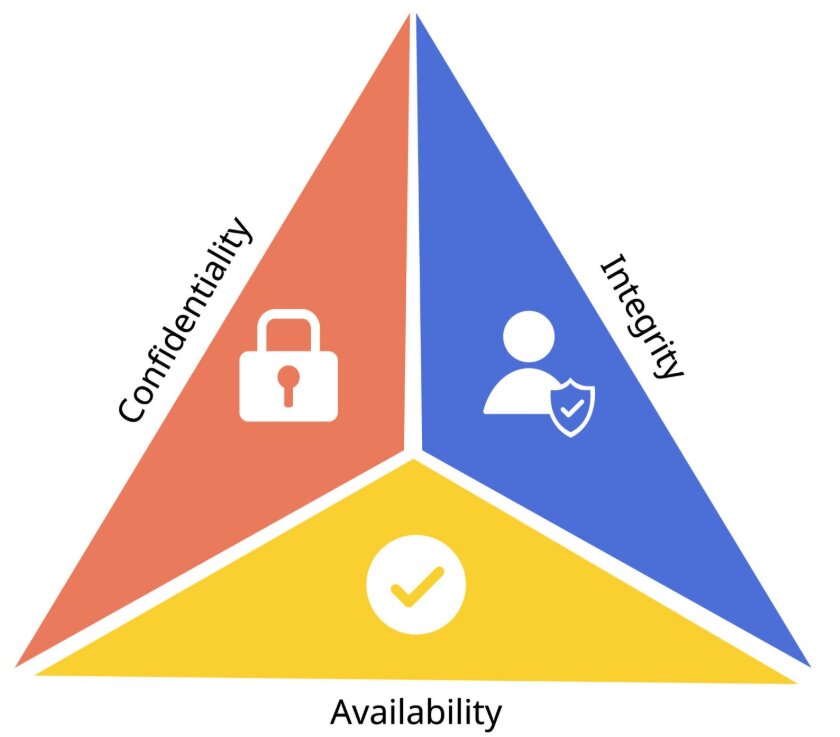
Confidentiality, Integrity, and Availability
The three pillars of information security are known as the CIA Triad: Confidentiality keeps data private, Integrity keeps data accurate and unaltered, and Availability ensures data and systems can be accessed when needed.
| Principle | Definition | Example |
|---|---|---|
| Confidentiality | Only authorized people can access data | Passwords, encryption, access control lists |
| Integrity | Data is accurate, complete, and unaltered | Checksums, version control, write protections |
| Availability | Data and systems are accessible when needed | Redundancy, backups, UPS power supplies |
Security vs Privacy vs Integrity
Security
Protecting data from unauthorized access, theft, or damage using technical, administrative, and physical controls.
Answers: "Is the data protected from threats?"
Privacy
Controlling who has access to personal/sensitive data and how it is used, stored, and shared.
Answers: "Who is allowed to see this data?"
Data Integrity
Ensuring data remains accurate, consistent, and unmodified over its lifecycle.
Answers: "Is the data still correct and complete?"
Common Threats
| Threat | Description | Impact |
|---|---|---|
| Malware | Malicious software designed to cause harm | Data loss, system damage |
| Phishing | Fake emails/websites to steal credentials | Identity theft, data breach |
| Hacking | Unauthorized access to systems | Data theft, system compromise |
| Social engineering | Manipulating people to reveal information | Bypasses technical security measures |
| Natural disasters | Fire, flood, earthquake | Physical destruction of hardware/data |
| Human error | Accidental deletion, weak passwords | Data loss, unauthorized access |
Types of Malware (Deep Dive)
- Viruses: Programs that replicate themselves and attach to files to corrupt data.
- Worms: Standalone malware that spreads across networks without human intervention.
- Trojans: Malicious software disguised as legitimate programs.
- Ransomware: Encrypts data and demands payment for the decryption key.
Protection Methods
| Method | What it does | Protects Against |
|---|---|---|
| Strong passwords | Use long, unpredictable passwords with high entropy; combine with account lockout or login attempt limits to slow brute-force attacks. | Unauthorized access |
| Authentication | Verifies the identity of a user before access is granted. | Impersonation |
| Authorization | Determines what a verified user is allowed to do after logging in. | Excessive privileges |
| Biometrics | Uses unique physical or behavioural traits such as fingerprint, facial recognition, or iris scan to authenticate a user. | Stolen passwords, shared credentials |
| Two-Factor Authentication (2FA) | Requires two different factors, such as a password plus a code sent to a phone or a fingerprint plus a PIN. | Compromised passwords |
| Antivirus software | Detects, quarantines, and removes malicious software. | Malware |
| Firewalls | Monitors and filters incoming and outgoing network traffic based on rules. | Network intrusion |
| Encryption | Converts readable data into unreadable ciphertext using a key. | Data interception |
| Access control | Restricts users to only the files, folders, or functions they are permitted to use. | Unauthorized users |
| Backups | Copies data so it can be restored after loss, corruption, or ransomware. | Data loss |
| Physical security | Protects equipment using locks, CCTV, controlled entry, and secure storage. | Theft, natural disasters |
| User training | Teaches staff to recognise threats and follow secure procedures. | Phishing, social engineering |
Encryption vs Hashing
Data Security and Integrity
Encryption is reversible when the correct key is used, so it protects confidentiality during storage or transmission. Hashing is one-way, so it is used to check integrity and store passwords safely without revealing the original value.
For example, a file can be encrypted so only the intended receiver can read it, while a checksum or hash can be used to confirm that the file was not altered during transfer.
Best Practices for Data Protection
- Keep all software and Operating Systems up to date.
- Use strong, unique passwords and enable Multi-Factor Authentication (MFA).
- Never click suspicious links in emails or download unverified attachments.
- Encrypt your sensitive files and perform regular backups.
Data Protection Laws
Many countries have laws governing data protection. The EU's GDPR (General Data Protection Regulation) and Kazakhstan's Law on Personal Data regulate how organizations collect, store, and use personal data. Key principles include lawfulness, fairness and transparency, purpose limitation, data minimisation, accuracy, storage limitation, integrity and confidentiality, and accountability.
Understanding Data Integrity
To ensure data integrity, systems use validation and verification methods. Validation checks whether data fits predefined rules before it is accepted, while verification checks whether the data entered or transmitted matches the original source.
Validation Checks
- Range check: confirms a value is within allowed limits, such as 1 to 12 for a month.
- Format check: confirms data follows the correct pattern, such as a postcode, email address, or date.
- Length check: confirms data has the right number of characters, such as a password of at least 8 characters.
- Check digit: an extra digit calculated from the rest of the code to detect typing errors, such as on barcodes or ISBNs.
Verification Methods
- Double entry: the data is entered twice and the two copies are compared for differences.
- Parity check: a parity bit is added to detect errors during transmission.
- Checksum: a calculated value is sent with the data and recalculated at the destination to detect corruption.
Worked Examples
1 Scenario Analysis
Scenario: A hospital stores patient records electronically. A nurse accidentally deletes a patient's allergy information.
Analysis:
- Security — was not breached (no unauthorized access)
- Privacy — was not breached (no data exposed to outsiders)
- Integrity — WAS breached (data is now incomplete/inaccurate)
- Solution: Regular backups + access controls to limit delete permissions
2 Password Strength Assessment
| Password | Strength | Issue |
|---|---|---|
123456 |
❌ Very Weak | Common, very low entropy, easy to crack with brute force |
password |
❌ Weak | Dictionary word, low entropy, easy for automated attacks |
MyDogMax |
⚠️ Medium | No numbers/symbols, predictable pattern, moderate entropy |
K9$mP!xQ2w |
✅ Strong | Mixed, long, unique, high entropy, much harder to brute force |
3 Phishing Attack Response
Scenario: A finance officer receives an email that looks like it is from the school bank asking them to “verify account details” using a link. The link leads to a fake website that steals the login credentials.
Analysis:
- Technical controls: Firewalls and spam filters can block suspicious messages, malicious links, and known phishing domains.
- Administrative controls: User training helps staff recognise warning signs such as urgent language, spelling mistakes, and fake URLs.
- Additional protection: 2FA reduces the damage if the password is stolen, because the attacker still needs the second factor.
- Result: A layered approach is strongest because no single control stops every phishing attempt.
Common Pitfalls
Confusing Security and Privacy
A system can be secure (encrypted) but still violate privacy (e.g., a company collects more personal data than needed). Both must be addressed separately.
Assuming Backups = Security
Backups protect against data loss (availability + integrity), but they don't prevent unauthorized access (confidentiality). You need both.
Tasks
Define confidentiality, integrity, and availability. Give one example of each. [2 marks]
Explain the difference between authentication and authorization. Include one real-world example of each. [4 marks]
A school wants to reduce phishing incidents among staff. Explain how user training, spam filters, and firewalls could work together to reduce the risk. [4 marks]
Compare encryption and hashing for data protection and integrity. State when each should be used and explain why a hash cannot be reversed. [6 marks]
Self-Check Quiz
Q1: What does the CIA triad stand for?
Q2: Which principle ensures data has not been tampered with?
Q3: What is the difference between security and privacy?
Q4: Name three types of malware.
Q5: What is the difference between validation and verification?
Q6: Name one GDPR principle and explain it briefly.