Basic Algorithmic Structures & System Programming (PHP)
Every algorithm is built from three fundamental structures: sequence, selection, and iteration. We will first review these in Pseudocode and C++, and then apply them in PHP to build a database-connected project.
Learning Objectives
- 11.5.3.9 Describe and apply the sequential structure
- 11.5.3.10 Describe and apply the branching structure
- 11.5.3.11 Describe and apply the loop structure
- PHP.1 Write a program code using algorithmic structures in PHP
- PHP.2 Connect a PHP application to a database for data storage
Lesson Presentations
11.4A-algorithmic-structures.pdf & php (1).pptx · Slides for classroom use
Conceptual Anchor
The Recipe Analogy
Think of an algorithm as a cooking recipe. A sequence is doing steps in order (chop, mix, cook). A branch is a decision: "If the sauce is too thick, add water." A loop is repetition: "Stir every 2 minutes until golden." Every recipe — and every algorithm — uses combinations of these three structures.
Programming Constructs (Craig'n'Dave)
A clear, A-Level standard explanation of Sequence, Selection, Iteration, and Nested Structures from Craig'n'Dave.
Rules & Theory: Pseudocode & C++
1. Sequential Structure
Statements are executed one after another, in the order they appear. There are no decisions or repetitions — just straight-line execution.
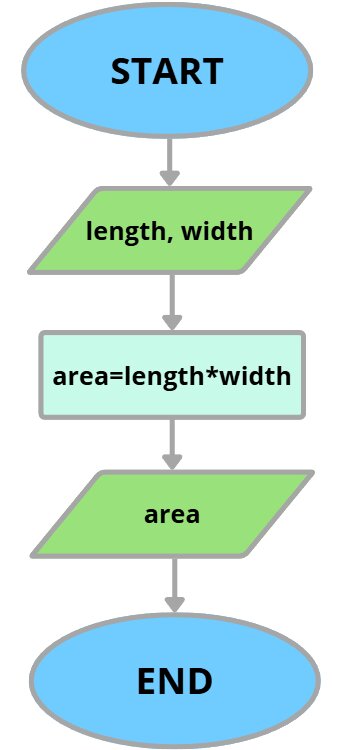
Pseudocode:
INPUT radius
area ← 3.14159 * radius * radius
OUTPUT "Area = ", area
C++:
#include <iostream>
using namespace std;

int main() {
    double radius;
    cout << "Enter radius: ";
    cin >> radius;
    double area = 3.14159 * radius * radius;
    cout << "Area = " << area << endl;
    return 0;
}
2. Branching Structure (Selection)
The program makes a decision based on a condition. If the condition is TRUE, one path is taken; otherwise, an alternative path is followed.
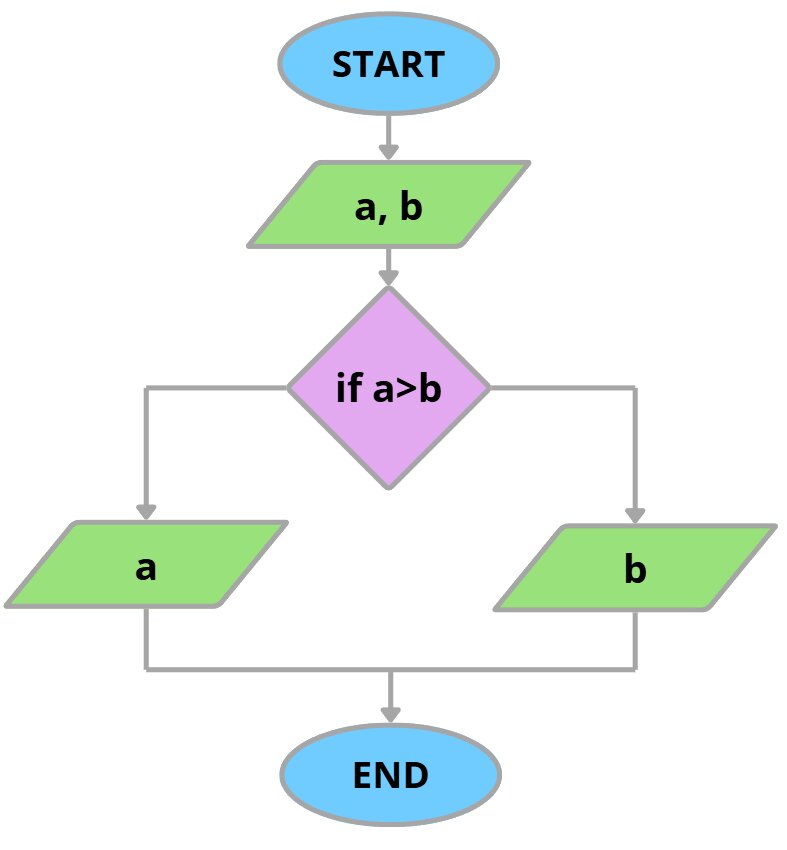
Pseudocode (IF/ELSE):
INPUT mark
IF mark >= 50 THEN
    OUTPUT "Pass"
ELSE
    OUTPUT "Fail"
ENDIF
C++ (switch):
char grade;
cin >> grade;
switch (grade) {
    case 'A': cout << "Excellent"; break;
    case 'B': cout << "Good";      break;
    case 'C': cout << "Satisfactory"; break;
    default:  cout << "Below standard";
}
3. Loop Structure (Iteration)
A group of statements is repeated while a condition is met (or a fixed number of times).
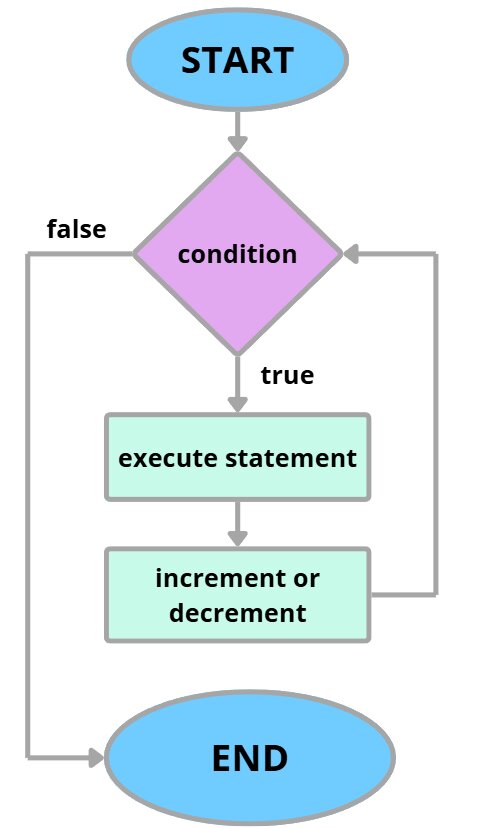
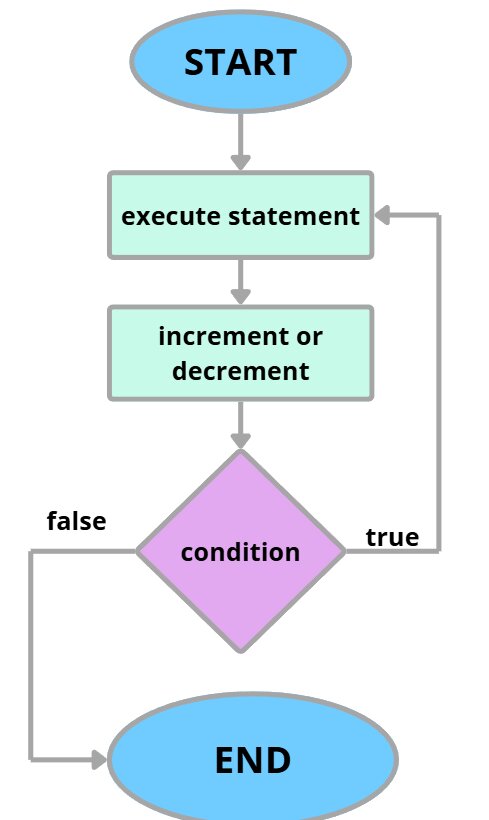
FOR loop — Pseudocode:
FOR i ← 1 TO 5
    OUTPUT i
NEXT i
WHILE loop — Pseudocode:
total ← 0
INPUT num
WHILE num <> -1
    total ← total + num
    INPUT num
ENDWHILE
OUTPUT "Total = ", total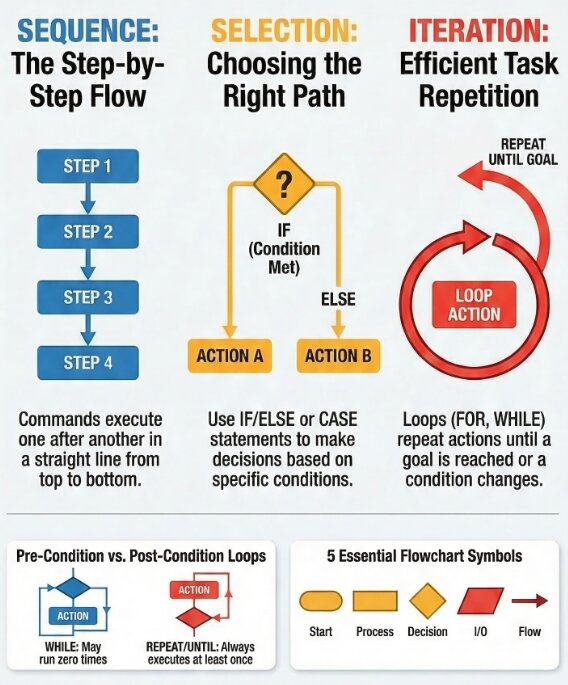
Worked Examples (Trace Tables)
1 Tracing a Loop
a ← 10
b ← 3
WHILE a > 0
    a ← a - b
    OUTPUT a
ENDWHILE| a | b | a > 0 | OUTPUT |
|---|---|---|---|
| 10 | 3 | TRUE | |
| 7 | TRUE | 7 | |
| 4 | TRUE | 4 | |
| 1 | TRUE | 1 | |
| -2 | FALSE | -2 |
Code Execution & Trace Tables Visualization
Term Project: School Student Registration System
| Criteria | Detailed Description | Marks |
|---|---|---|
| Core Functionality (PHP-Based) | Fully working PHP system: form handling, data storage (file/MySQL), navigation, and validation. | 1 |
| Sequential Structure (PHP Logic) | Clear multi-step processing in PHP (input → sanitization → validation → storage → output). Well-commented. | 1 |
| Conditional Statements | Effective use of if/else, elseif, or switch. Includes input validation, error handling, and branching logic. | 2 |
| Nested Conditional Statements | Use of nested if/else for complex validation (e.g., checking multiple conditions, duplicate IDs, etc.). | 1 |
| Loops (Iteration) | Use of loops (while, for, foreach) to process or display multiple records dynamically. | 1 |
| Nested Loops | Advanced use of nested loops (e.g., table generation, multi-dimensional data handling). | 2 |
| Code Quality & PHP Practices | Readable PHP code, proper structure, meaningful variables, comments explaining algorithmic logic. | 1 |
| User Interface & Experience | Clean layout, easy navigation, clear feedback messages. | 1 |
| Documentation (Algorithm Focused) | Clear explanation of where each structure is used (sequential, loops, conditionals, nested). Screenshots included. | 1 |
| Creativity & Advanced Features (Bonus) | Search/filter, edit/delete, login system, or database integration. | 1 |
| Total Marks: | 12 | |
Project Prep: Algorithmic Structures in PHP & Database
1. PHP Variables & Syntax
<?php
$name = "John"; // String
$age = 20;      // Integer
echo "Student: " . $name;
?>
2. Branching & Nested Conditionals (For Validation)
This helps you score marks in Conditional Statements and Nested Conditional Statements.
<?php
$score = 85;
$hasID = true;

// Nested Conditional Statement
if ($hasID == true) {
    if ($score >= 90) {
        echo "A";
    } elseif ($score >= 70) {
        echo "B";
    } else {
        echo "C";
    }
} else {
    echo "Error: No ID found.";
}
?>
3. Loops & Nested Loops (For HTML Tables)
This helps you score marks in Loops and Nested Loops.
<?php
// Nested loops to generate a grid/table
echo "<table border='1'>";
for ($row = 1; $row <= 3; $row++) {
    echo "<tr>";
    for ($col = 1; $col <= 2; $col++) {
        echo "<td>Row $row, Col $col</td>";
    }
    echo "</tr>";
}
echo "</table>";
?>
4. Core Functionality: HTML Forms & Database Connection (MySQL)
Form Handling: Data sent from an HTML form using method="POST" is retrieved using the $_POST array.
Database Connection: Use mysqli_connect() to store your form data permanently into a MySQL database.
<!-- 1. HTML Form -->
<form method="POST" action="">
    Name: <input type="text" name="studentName" required>
    <input type="submit" value="Register">
</form>

<?php
// 2. PHP Sequential Processing & Database Connection
if ($_SERVER["REQUEST_METHOD"] == "POST") {

    // Step A: Sanitization
    $name = $_POST['studentName'];

    // Step B: Database Connection Details
    $host = "localhost";
    $user = "root";
    $pass = "";
    $dbname = "school_db";

    // Step C: Connect
    $conn = mysqli_connect($host, $user, $pass, $dbname);

    // Step D: Nested Conditional Validation
    if (!$conn) {
        die("Connection failed: " . mysqli_connect_error());
    } else {
        if (!empty($name)) {
            // Step E: Insert Query
            $sql = "INSERT INTO students (name) VALUES ('$name')";
            if (mysqli_query($conn, $sql)) {
                echo "New record created successfully";
            }
        } else {
            echo "Name cannot be empty";
        }
    }
    // Step F: Close Connection
    mysqli_close($conn);
}
?>
Project Tip
To get maximum marks, ensure you clearly comment your code. Label where you are using Sequential, Selection, and Iteration so the examiner can see you hit the rubric criteria.
Tasks
Name the three basic algorithmic structures and describe how the $_POST method retrieves data.
Write a PHP script to connect to a database named "library_db" and display an error message if the connection fails using an IF statement.
A student wrote: FOR i ← 1 TO 10 ... NEXT i but inside the loop also has i ← i + 1. Trace the execution and explain what goes wrong.
Set up your local server (XAMPP/MAMP). Create your HTML Registration Form and establish a blank PHP file that successfully connects to your local database.
Self-Check Quiz
Q1: Which flowchart shape represents a decision?
Q2: Which PHP function is used to establish a connection to a MySQL database?
mysqli_connect()Q3: Fix the error in the following PHP code: echo "Hello"
echo "Hello";Reflection & Homework
Reflection: What did you learn today? What aspect of the project rubric seems the most challenging?